
Creators can learn a lot from marketers—this especially applies to organization and planning! Today we’ll be discussing content calendars and how you can use them to plan your content out just a bit better.
What is a Content Calendar?
A content calendar is typically a spreadsheet, and as the name suggests, it is a calendar for you to plan out content. The format, specificity, and other details will vary from person to person, but the main thing is that a content calendar is where you plan your content.
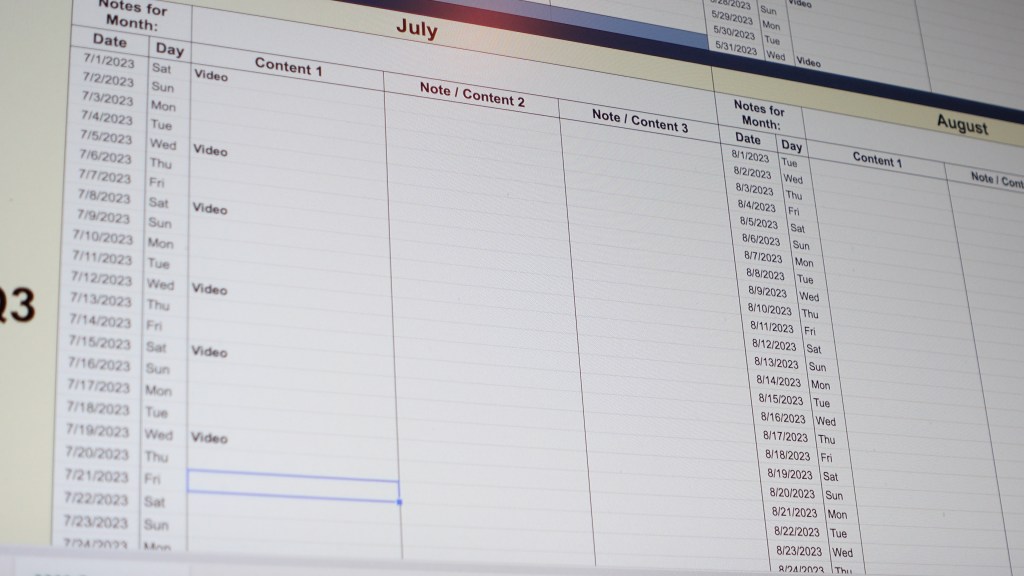
The biggest benefits of using one are to get ideas out of your head and to help you plan to get them made! Your brain is for having ideas, not holding them, so the content calendar serves as a place to hold your ideas and decide what to do with them.
Decide Your Media
What type of content are you planning to create?

Do you just want to make long-form videos? Short-form videos on TikTok or Shorts? Are you going to blog? Will you be posting photos on Instagram sometimes too?
Do you want to be a streamer? If you’ve watched my video on applying the User Journey Model to content, you’ll know if you want to grow, you probably need to be making videos on YouTube or TikTok too.
The first step in building your content calendar is to know which platform or media you’ll be posting on. TikTok? Twitch? YouTube? Instagram? Facebook?
This step is determining your identity as a creator. That sounds like high stakes, but it’s not that deep—just consider if you want to primarily be known as a streamer, a YouTuber, a TikTokker, an Instagrammer, and so on, as that will be the core of your strategy.
In my case, I mainly post longform YouTube videos, but I also cut videos down to post onto TikTok and Shorts, and I occasionally stream on Twitch. My media are YouTube videos, shortform videos on TikTok and Shorts, and streams. I am mainly a YouTuber.
What are your content media, and which is your primary focus?
Making the Calendar
Don’t actually make a calendar from scratch… at first. There are so many great, free templates you can download. This is a good one from HubSpot which you can modify, though you’ll need to give some information. https://offers.hubspot.com/social-media-content-calendar
I’ll share the template I use as well here, just click make a copy to add it to your drive, and adjust the dates and days of the week if you’re downloading after 2023.
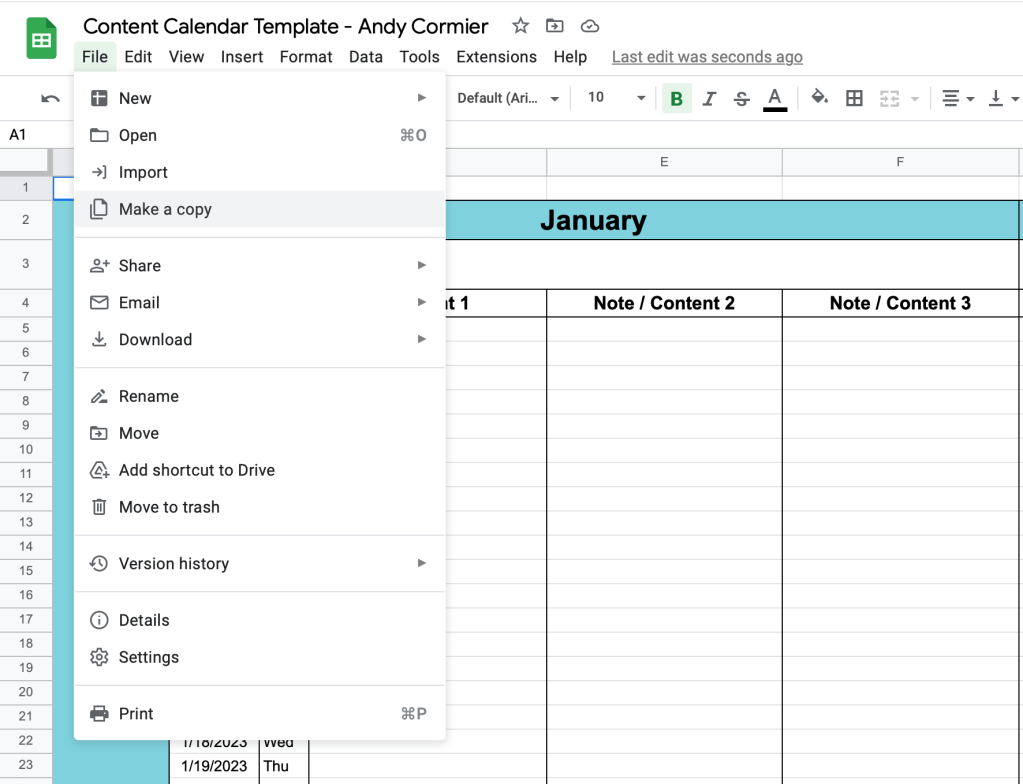
I have an area for monthly notes/goals, then 3 columns to list content or daily notes, and I have this for every single month on 1 sheet. I like the HubSpot calendar, but I’d rather have to refresh the calendar once a year rather than every month.
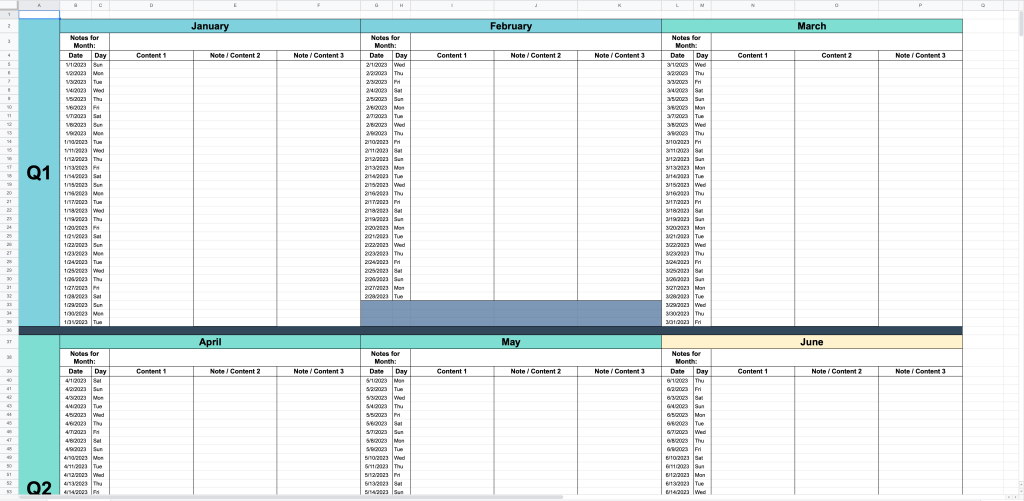
Next, what goes on it? Basically, I think up what content I plan on posting any given day and put it on the calendar! I bold anything I haven’t made yet so it’s more visible, then once I have completelty finished a post (IE. Uploaded, thumbnail made, tags, and scheduled on YouTube), I un-bold it.
I also use the content calendar as a reference for my project and task managament using Notion, but we won’t get into that here. What matters most now is the calendar. I have a template in the description, and you should modify it to suit your needs and content!
Find Your Cadence
Once you know your media and have a calendar ready, know your limits. Considering how much time you have to work on creativity, and figure out a posting frequency, or cadence, that works for that. If you have a full time job or have other major responsibilities, you might not have as much time as you hope.
In my life, I am writing as a freelancer for MakeUseOf, building a freelance social media and video business, hunting for a full-time job, and creating content. If I fully optimized my schedule I could probably post 3-5 longform scripted videos per week and a TikTok every day in my current style, but no matter how optimized you are, life isn’t optimized and things come up!
Don’t plan as if you’ll be at 100% efficienct every day. Plan for 70-80% of what you can do so that you have wiggle room for other projects and surprises from life. Thus, 70% of 3-5 longform videos per week and daily TikToks could be 2-3 scripted videos and daily TikToks or 4-5 videos and no TikToks, or even 3-4 unscripted vlogs and daily tiktoks. I generally opt for 2 scripted videos per week and daily TikToks, though I’m behind as of writing this, and I have plenty of time for surprises and to get my freelance work done. When I have extra time, that’s when I fit in extra videos or streams!
The point is, even if your 100% can produce a certain amount of content, no one is 100% every day—life always has its surprises, and it’s better to optimize for sustainability. Set your posting cadence at a 70-80% achievable standard and overachieve when you have extra time & energy. You probably won’t have a perfect cadence right away! Take some trial and error to get it right as you develop a sustainable output.
To illustrate in the calendar, I usually pre-set videos on Wednesdays and Saturdays, then fill in other columns for shortform content, streams, and Patreon posts as they’re done and less strictly.
Managing Content, Projects, and Yourself
With a cadence set, this is when we get to making content.
Set Content Clusters
Marketers will set campaigns for their content on social media, but I recommend thinking of content clusters rather than campaigns in most cases. Content clusters are when you make content within similar themes so that you have more similar videos for the algorithm to recommend to viewers over time. My clusters are ocarinas, marketing for creators, and creative tech, and I have plenty of content in each.

As it relates to my cadence, I post to my primary cluster, ocarinas, for 1 of my 2 videos per week, then the other video will relate to one or both of my other clusters.
Work Backwards from Publication
As you schedule videos on your calendar, consider how long it takes to make each video and work backwards for when to start working! If you know you generally take ~2 hours to write a video, ~1 hour to revise the script, ~2 hours to shoot a video, ~4 hours to edit, and another ~1 hour to make a thumbnail and handle YouTube upload stuff, that’s 10 hours of work to account for.
If you’re publishing the video on a Friday, consider the amount of time you have available beforehand, then plan accordingly. You will get better at making videos, so you’ll probably take less time as you improve as well.
Consider Batching Work
I am testing out a batching strategy to be more efficient making my content. Monday and Tuesday are writing days, Wednesday and Thursday are shooting and first-cut editing days, and Friday and Saturday are B-cut, export, and upload days. Batching is a great way to stack similar tasks so it’s easier to focus, but you’ll need a longer runway before each upload if you only do certain tasks on certain days.
One week in, I indeed am getting more done in less time!
Rescheduling is FINE
With all this considered, give yourself grace, and be fine with rescheduling. Even when you work at 70% capacity with plenty of slack, life can come at you at 200% and make you fall behind. It’s okay to miss uploads, even if it’s premium content on Patreon. If your system usually works, trust it. Keep batching work and scheduling content as normal, and forgive yourself when life gets in the way.

I will often get in an amazing creative groove for like, 3-4 weeks, developing a huge backlog of content and feeling great about myself and my productivity. Then, between feeling complacent because I have a backlog and curveballs from life, I often fall behind within a couple weeks. From that, I start to judge myself for not living up to my standards and systems, feel bad about it, then fall even farther behind. The point is, judging yourself for falling behind doesn’t help at all. If you fall behind, simply think “oh well” then take one step to get back on it or just accept you need a little break.
I have so many projects I keep pushing back week after week on my calendar because of a myriad of reasons, and it’s okay! Some projects need more time to develop, and sometimes you need to take care of yourself before you take care of your content. Yes, be diligent, develop systems, and have some discipline to work even when you don’t feel like it, but be sustainable, take breaks, and recognize that systems like calendars are imperfect, machine-like models to help us organize work, but ultimately we are human and that life can be inconsistent and disorganized.
In Summary…
Figure out what kind of content you want to make. Find/make a calendar. Set a posting cadence that’s realistic for your time & energy. Set content clusters to focus on, plan your work backward from publication dates, consider batching work for efficiency, and give yourself the grace to be okay with rescheduling and falling behind at times.
A content calendar is an extremely useful system to help you plan your creative work, but remember you’re a person who makes content, not a content creation machine. As you make content and plan your calendar, continually adjust it and other project management tools to work better for you. Maybe you were too optimistic with your cadence, maybe you’ll get faster at editing, maybe batching will get you so far ahead on work you can actually do more.
Be disciplined, be diligent, and be consistent, but be flexible and human.
Let me know in the comments what you’re struggling with in your creative journey, and I’ll try to help! Otherwise, check out my post on applying the User Journey marketing model to your creative content.
 Andy Cormier