Why Ocarinas Are So Niche

In most of the world, aside from Japan, South Korea, and Taiwan, people don’t know what an ocarina is.

If I pick a random street in America and play the ocarina, I’d wager that more than 90% of passers by would not know what the instrument is, whereas when I’ve done the same in Japan, the opposite is true.

Ocarinas are an obsucre, niche instrument in most of the world. Let’s try to understand why!

Can We Verify that the Ocarina is Actually Obscure?

Yes. Let’s dive in to Google Trends.
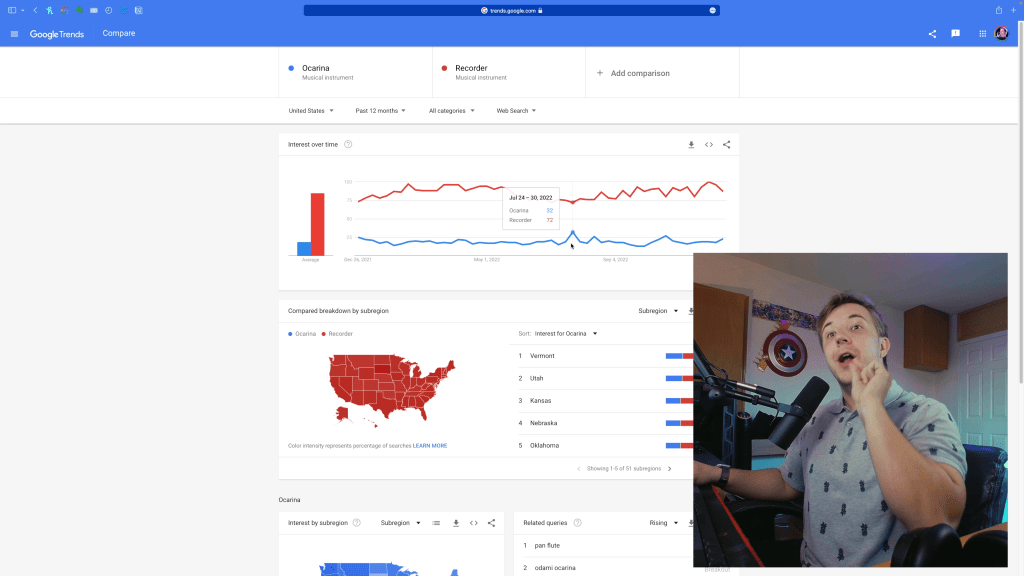
If we compare Ocarinas to Recorders, the most similar instrument in terms of sound and niche, you’ll see recorders absolutely dominate them with 4 to 5 times more searches. The spikes near the middle before September would result from Freckled Zelda’s appearance on America’s Got Talent.

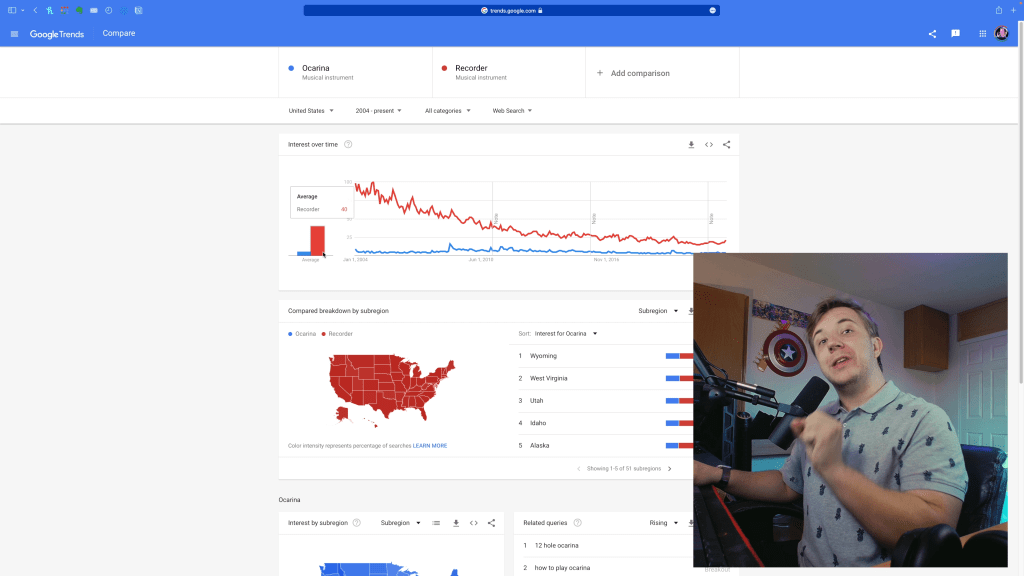
If we zoom out from 2004, you’ll see the recorder has gotten less popular, but the ocarina hasn’t gotten more popular either.
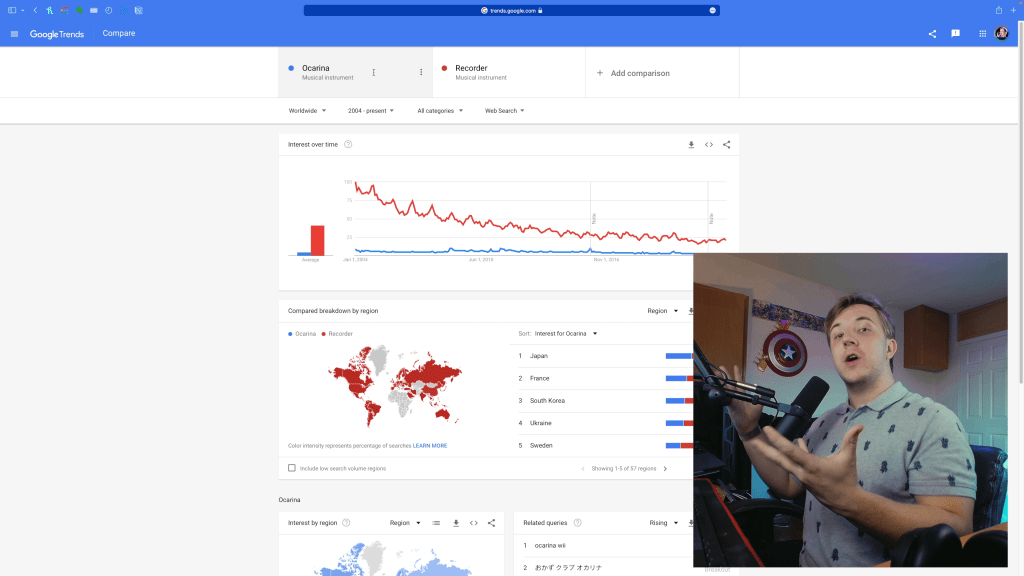
And if we zoom out to account for the entire world, it looks about the same.
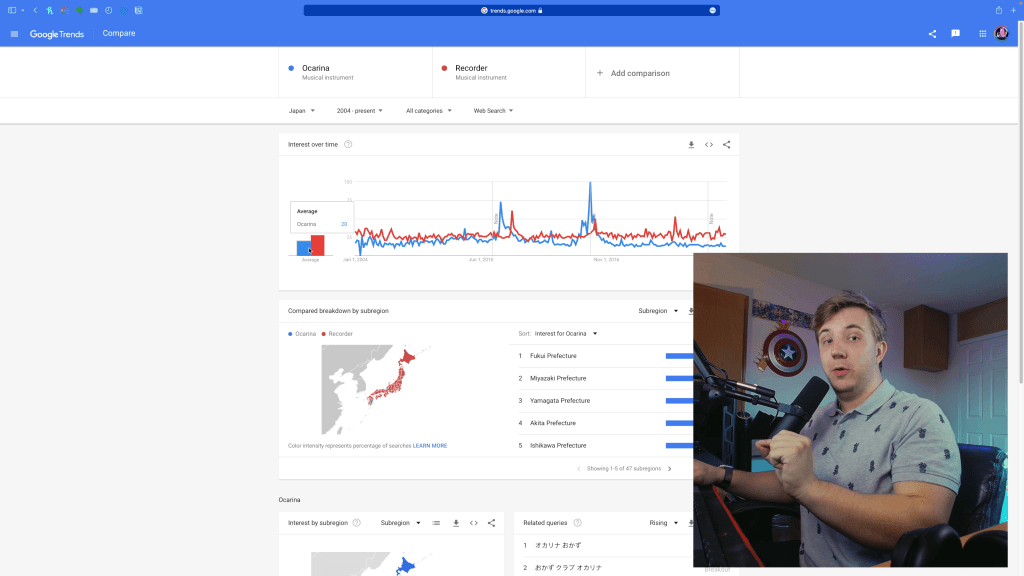
But when we switch to Japan, you’ll see ocarinas overtake recorders sometimes, and recorders only average a bit over ocarinas in search volume!
And if we throw pianos into the worldwide mix, the situation is even more bleak for ocarinas and their (lack of) notoriety.
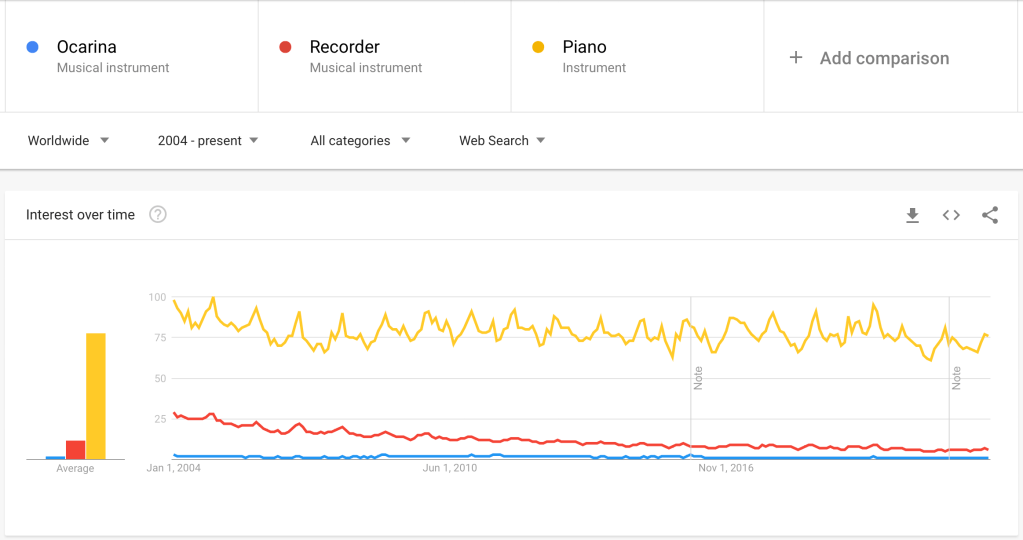
But this is all to say that there is hard data to prove ocarinas are a niche instrument! The picture is even bleaker when we throw pianos into the comparison.

You thought we were done looking at data? There’s more, and we can tell the story of the ocarina using this! Google trends only goes back as far as 2004, but we want to go back to 1853 when Giuseppe Donati invented the modern transverse ocarina. Using Google Ngram viewer, we can see usage of the word “ocarina” in literature dating back that far!
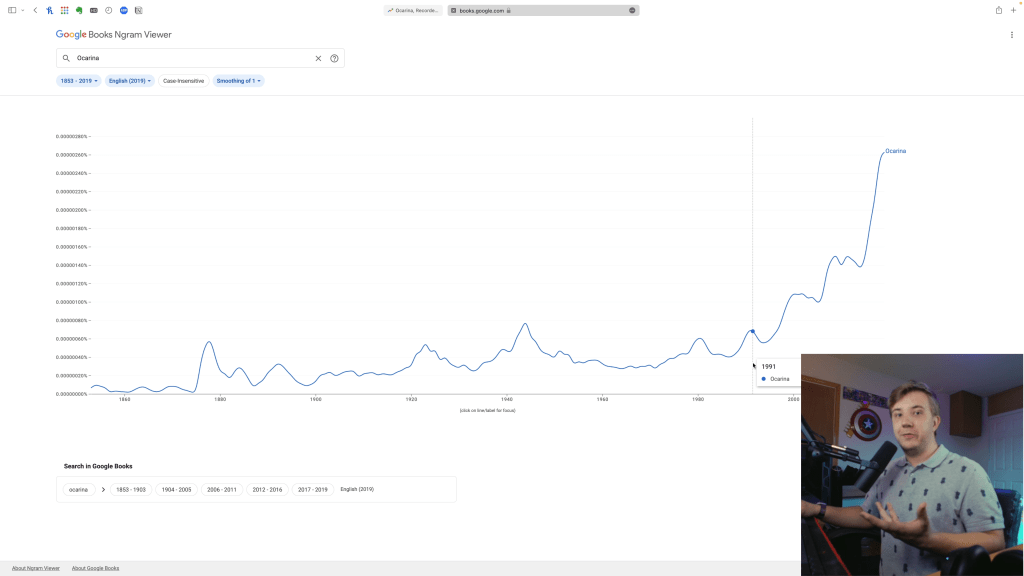
We don’t have as much specificity, since we only get data on the word “Ocarina,” so starting in the 90s, the data spikes upward because of ocarinas in media like Zelda: Ocarina of Time. But how did we get there?

The first spike was in the 1870s, and while I’m not entirely sure why that is, I can explain every spike afterward! In 1928, Takashi Aketagawa invented the 12-hole ocarina, building off the 10-hole Italian design. This shows an international expansion of the instrument, but it doesn’t stop there!

During World War II, US servicemen were provided an ocarina in their packs to play music and help build morale, so through the 1940s, ocarinas experienced their peak popularity as an instrument in the United States. In 1946, a popular group called The Foursome also released an ocarina album, and they even collaborated with Bing Crosby!

Unfortunately, that popularity diminished in America shortly after, but around 1980, ocarinas exploded in Asia thanksa to Nomura Sojiro, if you see that bump there. From then, ocarinas became well-known in Japan and were featured in popular media, mainly Ocarina of Time, from which you see the usage of the term “ocarina” fly upwards, making the Ngram useless for measuring the instrument alone after 1990-ish given all the interception from gaming and other media.

We also can’t use the Ngram for “recorder” as there are so many things “recorder” can mean outside the instrument, from recording writing to recording sound to transcripts and even the BIBLE. The disambiguation for “recorder” on Wikipedia is a very long list.

But with all this data and history in mind, why are ocarinas so niche?

WHY The Ocarina is Niche

The main reason ocarinas remain niche is thanks to out arch enemy: the recorder.

Photo by Victoria Akvarel on Pexels.com

First, just like making content in the same niche as someone else will likely leave you in that person’s shadow, the same goes for instruments. Recorders have been around since the middle ages in Europe, and while ocarinas have been around for over 10,000 years in Asia and South America, modern music has a heavy European bias, so recorders win in terms of history and their establishment in the musical world.

By function as an instrument, ocarinas and recorders are nearly identical, but recorders have many advantages. They play differently—recorders have multiple octaves for the same fingering (like other flutes) whereas ocarinas have one note per fingering—but have very similar sweet sounds. In addition, outside of multi-chamber ocarinas, recorders have a much wider range thanks to having nearly three playable octaves. To top it all off, recorders also come in various ranges and can be played in ensembles… just like ocarinas. I prefer the sound of the ocarina, and ocarinas are 100% easier to learn the basics of, but once again, recorders have more versatile function as instruments. By musical function, recorders also win here.

Last, let’s compare the marketing of each instrument. Ocarinas have the elephant in the room of all their appearances in modern media, from Zelda to Totoro to Animal Crossing, but recorders have an even larger, more capitalistic elephant: recorders are taught in schools. Almost everyone I know had recorder classes in their elementary school days as an intro to music. Though this has tarnished the image of the recorder as a “kiddie instrument” to many, I would wager over 80% of Americans know what a recorder is while maybe 10% know the ocarina as an instrument.

The ocarina does do some things better! It’s generally more expressive in its sound than recorders (though I am biased as an ocarinist with minimal recorder experience). Comparably, ocarinas are also far easier to learn, as the octave jumps of recorders make it difficult for beginners to develop proper breath control. Multi-chamber ocarinas also achieve the same range as a recorder without the octave jump issue! Ocarinas are also generally more portable, as they have a more pocketable shape and can more easily fit into most bags. I also simply prefer the sound of ocarinas, but great recorder performances do also sound amazing.

Outside the recorder, there are other factors. For example, the ocarina’s inability to play dynamics (easily) prevents it from being a viable orchestral instrument in most cases (outside of soloist performances). If I play a C on the ocarina in forte, it gets sharp. If I play in piano, it gets flat. Ocarinas only have one in-tune volume unless you do alternate fingerings and have superb breath pressure control, making them functionally useless for orchestras outside of solos—recorders have this same issue, actually, but there are far more resources for how to play alternate fingerings to adjust volume while maintaining pitch. On that note of solos, you know what other instrument occupies the niche of expressive solos in orchestral performances? The human voice. Almost any case where someone might play an ocarina as a solo, you’re far more likely to have a singer. They get lyrics, too!

This all may sound like me calling the ocarina a useless instrument, but look at my channel—half of all I talk about is ocarinas and trying to help people learn them! Ocarinas, like every instrument, have limitations, but many of these can be circumvented. Regardless of limitations, the ocarina is my favorite instrument. It’s extremely worthwhile for most people to learn, and I’ve seen the heights of skill musicians have with it as a serious instrument. But back to why it’s niche.

Finally, because of all these issues of its losses to the recorder and difficulty to use in orchestral performances, ocarinas have a lack of establishment. You can probably get in-person recorder, guitar, or ukulele lessons in your city, but you likely can only get ocarina lessons online from the few who might offer them. Most university music programs might have a baroque ensemble with recorders but nowhere for ocarinas to fit in. Almost every music store will have recorders or any orchestral instrument like trumpets or flutes, but if they have an ocarina, it’s probably the cheapest plastic one.

Note that this is not to discredit the many amazing ocarina communities, makers, educators, and creators doing their part to establish the instrument more! Ocarinas have a dedicated establishment, but if we compare that to any more mainstream instrument, there is comparably very little, as ocarinas simply are not a normalized, mainstream, well-known concept in society.

Because the ocarina is so niche, it lacks establishment in society (outside of Asia and some of Italy). Because the ocarina lacks establishment, it remains niche. It’s a feedback loop that we can try to change.

How to Popularize the Ocarina?

Many folks in the ocarina community have varying thoughts about this and about projecting the image of the ocarina as a serious, worthwhile instrument to learn. We saw the negative effects of recorders being everywhere and their image as a “kiddie” instrument but you know what? People know what a recorder is, and a lot more recorder players than ocarina players. We also don’t want to forever be tied to gaming, as that also can give the ocarina a “kiddie” image, but we also can’t reject that, since that’s how most people know about the ocarina at all.

With all that in mind, I have some thoughts on how to popularize the ocarina.

  1. Campaign for more schools to use ocarinas for their music programs.

    My friends David Ramos and Ocarina Owl have already been doing this. Some schools do use ocarinas instead of recorders! And given the easier initial learning curve, I think ocarinas will be more successful at making kids interested in music if given the chance. If kids have faster progress in learning music, they generally feel more confident and excited to continue pursuing it, and even if ocarinas primarily help kids to grow a general interest in music, they’ll at least know and appreciate the ocarina! Some will probably pursue the ocarina itself further.
  2. Get ocarinas featured in more media.

    You all saw the little spike in google searches after Freckled Zelda’s AGT performance. Featuring the ocarina works, whether that’s getting the ocarina more mainstream attention, writing more music for orchestras that feature ocarina soloists, finding ways to feature it in soundtracks, or doing what I and other creators do on YouTube. The more visible the ocarina is and the more accessible educational resources are, the more mainstream it’ll become.
  3. As popularity grows, grow the infrastructure!

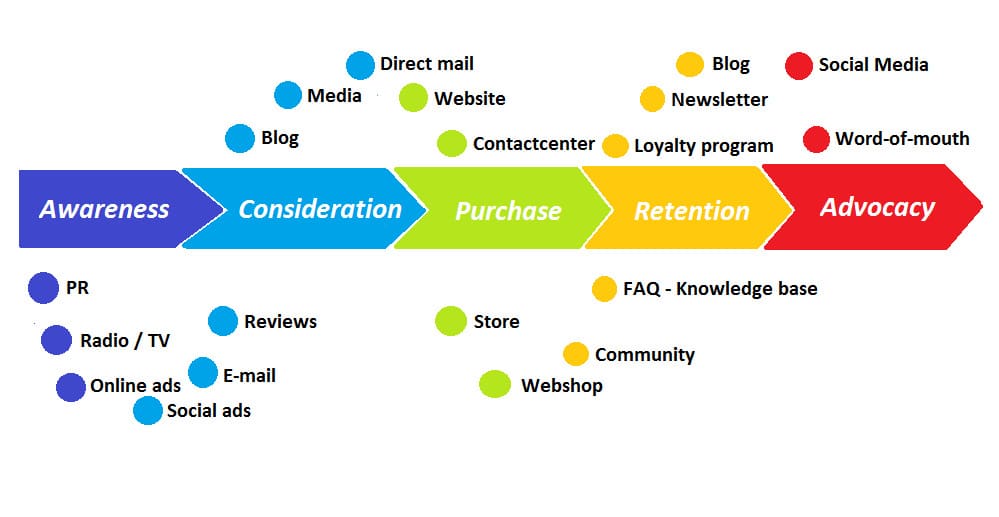
    In marketing, there’s a concept called the “user journey” which goes from awareness to consideration to purchase to retention to advocacy. If we make more people aware of the ocarina to the point of considering buying one, people need to know the right ones to purchase! If people purchase the ocarina, we build retention buy developing resources from beginner to advanced levels. We develop ocarina advocates when those people then start performing, writing music, recommending the instrument, making content, or something else to enthusiastically share it.

    For most people, the ocarina user journey stops at the purchase. With all the crappy amazon brands, people likely get cheap ocarinas. With how fragmented resources are, many people never learn to play proficiently even if they have a good instrument. And then most people who get good and love the ocarina keep their music to themselves, which stops this funnel from becoming a positive-feedback-loop cycle. The advocates drive awareness, and we could all do better making more people into advocates!That’s why I make my content—to help people make the right purchase, to help point them towards the resources to improve their skills, and to eventually build more advocacy around ocarinas to transform it from a niche instrument into something more normalized.
What can YOU do?

If I have helped you in your ocarina journey, the biggest thing you can do is to be an advocate for the instrument! Post ocarina videos to TikTok, maybe write some music, share educational ocarina content (like mine 🥸), and if you don’t want to put yourself out there, ALWAYS engage with ocarina content you see! Leave likes, subscribe to the creators, comment, watch to the end, do all that—the algorithms promote content that gets more engagement and result in longer viewing sessions, so engage with and watch lots of ocarina content to help it promote ocarinas!

Watch my playlist of ocarina videos below to get started 🫡

The ocarina may be niche, but we have the tools to help it grow!

M1 Max MacBook Pro After ONE YEAR Usage

My 14” M1 Max MacBook Pro arrived in the mail almost exactly a year ago. It’s been my daily driver ever since for everything from work, editing videos, streaming, and leisure. Was the M1 Max worth over $3,000? Is it everything I wanted it to be? Would I recommend such high specs for you?

Find out by reading on, or watch my video!

Why I Bought It

In late 2020, I built a powerful gaming PC. I really enjoyed the specs I gained and how nice my games looked, how snappy my editing software was, and more or less the options it opened up–nothing I wanted to do was limited by my hardware.

Except mobility, which I really noticed when my company switched to a hybrid model and I was stuck lugging a low-spec gaming laptop to do work and had to re-live all the hardware limitations I built a PC to escape from.

Fast forward to the announcement of M1 Pro and M1 Max chips. They seemed to good to be true—virtually as fast as my gaming desktop in a tiny chassis with 10+ hours of battery life. Needless to say, I wanted one so I could work from wherever with all the power of my desktop at home.

I ordered one with the following specs:

  • M1 Max chip w/ 24-core GPU (not the full 32-core model)
  • 32 GB RAM
  • 2 TB SSD

I wanted an ultra-powerful laptop that could handle editing 4K video, had plenty of battery life, and was thin and portable. Furthermore, I wanted something with specs good enough to last the next 5 or more years. I got all of that and more in my first venture to macOS.

Switching to macOS from Windows

There was definitely friction at first, such as re-training my fingers to use the command key instead of control, or learning more specific bits about macOS and its features. Once I got over the learning stage, I fell in love with macOS. Windows doesn’t have a horrible user experience, but macOS is just so nice. Little things like navigation, trackpad gestures (which I also use on my MX Mouse), integration with the rest of my Apple ecosystem, dramatically improved system stability over Windows, multiple desktops, iPad as an extra touch screen monitor, and more. While Windows and Mac do share many of these features, such as multiple desktops, they’re better implemented and more usable in macOS.

I still use my Windows PC all the time for gaming, but with how nice it feels to use macOS, it became my daily driver. On top of that, my Mac uses less than 15% of the electricity as my Windows—it uses less energy than just my GPU— so there’s energy savings too while getting almost the exact same performance on productivity!

Unexpected Perks

I only expected to use my Mac as a mobile productivity + creativity machine and my daily driver for most computing, but it ended up being so much more.

With the powerful specs it has (I.E. total overkill for this process) it actually became my new streaming PC. I worked at AVerMedia, so I set up capture cards and audio mixing hardware I’ve accumulated such that I can use the MacBook for streaming while capturing my Windows PC for gaming. I have a video on this setup!

Using the technical knowledge I gained from studying macOS and streaming on it, I also landed a freelance writing gig with MakeUseOf! Although I’ve taken a break from that, it was a very unexpected perk to specifically land a role as a staff writer for the Mac section of the site.

Ports! I never even considered how important having three Thunderbolt 4 ports would be when I purchased, but it is a game changer. With these ports, I have 2 external 4K monitors, USB hubs, and more so I can use all of my peripherals like Stream Decks, capture cards, audio mixing, and more. It’s also really nice having an SD card slot for exporting photos and videos quickly. I get the full desktop experienced when I’m docked in, which I’m so thankful for—most of my usage is as a “desktop” connected to all my monitors and peripherals, so I’m glad I could connect everything for my overkill stream setup without limitation.

Limitations

While I got so much more out of this MacBook than I initially bargained for, it did come with limitations compared to my desktop.

First off, no gaming, but that’s not why I have this. I can play games like RuneScape and Minecraft on the Mac, but I still have my gaming PC. I just switch to that when I’m gaming. I knew this limitation coming in, so it’s literally no issue. In fact, the lack of gaming is actually really helpful for using this as a productivity machine!

Next, issues with video editing. Weirdly, in Adobe Premiere Pro, if I use 4K footage straight from the camera, I simply cannot preview footage at 2X speed. Obviously this is a “nice to have,” but it literally doubles the speed of my editing workflow. However, I overcame this by using capture cards and recording in OBS instead, for which I could edit at 2X speed. As far as I know Final Cut Pro and DaVinci Resolve don’t have this issue, so I may switch when my Adobe membership expires.

Third, when it comes to using OBS and streaming, I do have fewer options. I’ve accepted these limitations and use my Mac as my streaming PC, but it was difficult losing stuff like access to PCIe capture cards and certain useful OBS plugins, needing to use workarounds for capturing system audio, and getting fewer features in my software from Elgato and AVerMedia. However, the dual PC streaming life is so much nicer than running OBS and gaming on the same PC and all the performance issues thereof.

Additionally, there are definitely some Windows features I miss. As someone who works in social media, there’s a lot of copying and pasting going on, and Windows has a handy feature called clipboard history, where if you press Windows + V, you can see everything you’ve copied and pasted since booting up. I used this feature every day on my Windows PC, and that’s the one thing that I miss from switchinbg to Mac. However, the switch is worth the loss especially when I can use software like Text Expander or commands on my Stream Decks to make up for it—watch my video on using a Mac to stream for more!

Last, I keep running into high RAM usage. 32 GB is plenty for everything I do, but I often get borderline maxed out RAM and high memory pressure by just multitasking Premiere Pro, Notion, and two windows of Safari alongside all my background processes. Maintenance for this is relatively easy—occasionally trim my tabs, quit and re-open software, restart my Mac, things like that—but I kinda wish I got the 64 GB model instead to handle the heaps of software I have running. That’s my only regret, though!

Would I Recommend for YOU?

My M1 Max MacBook Pro was very worth it for me. I am a tech enthusiast, and I push my hardware to its limits. Most things I do don’t push this laptop, and I could probably have just as good a time with the M1 Pro chip, but I do make use of all this laptop’s specs. I spent my entire life building desktop PCs and never stopped to think how amazing it would be if I could take that power anywhere.

Just because it was right for me doesn’t mean it is right for you though! You can get other laptops that have similar specs at a lower price but might sacrifice on portability and battery life, such as a lot of current gaming laptops. You can also sacrifice some power and get a lower-specced M1 or M2 laptop from Apple, which would be enough for most workflows I do, just not quite as smooth. To illustrate, a M1 MacBook Air goes on sale for as low as $800 and, aside from snappy 4K video editing, could probably do most of the things my M1 Max does, just slower and with less ability to multi-task. If you don’t regularly use resource-intensive workflows like 4K or 8K video editing, 3D, or other pro use cases, the M1 Max is absolute overkill!

But I like overkill, so it’s right for me—and if it’s overkill now, it’ll surely last the next 5 years!

If this was helpful for you, consider checking out my video on a great travel work setup! It’s focused on using a MacBook, so any macOS user will benefit! Otherwise, leave a like, subscribe for more, watch that video next, and comment if you’ve switched from Windows to Mac! Thanks for watching, and I’ll see you next time. Happy creating!

How to be a Successful Content Creator (according to AI)

I used a tool called copy.ai to see what it thinks creators should do to be successful. The remainder of this post was written by AI—half of it is surprisingly good advice, while the rest ranges from mediocre to unintelligible to a seeming cry for help.

Watch my video for how I got AI to write this and detailed commentary for each section and its (questionable) advice!

How to be a Successful Content Creator

Introduction

As a content creator, your job is to take the world around you, capture it on camera and share it with the internet. You have to be observant, curious, and creative. You also need to be organized and focused while still staying true to yourself.

Pay attention to analytics and metrics

After you publish a piece of content, it’s important to monitor the analytics. This is especially true on social media platforms, where metrics such as likes, comments and shares can help you determine how well your content is performing.

  • Think about what metrics are most important to your brand and its goals. For example, if you’re trying to build an engaged audience on social media, then likes are more meaningful than comments or shares since they indicate that people are actually reading the pieces of content in their feeds rather than simply scrolling past them.Look at different time intervals for each platform that you post to—if someone only clicks “like” when something appears in their feed within 24 hours but doesn’t ever engage with older posts (even those months old), this means there’s nothing wrong with the quality or relevance of your most recent work; instead it’s just because they don’t spend enough time on Facebook throughout their day to see everything that comes out from brands they follow!
Make a schedule or calendar for posting and promoting content

It’s all about the schedule. Your social media posting, your promotional patterns, and even the content you create should be on a calendar. Why? Because you can’t expect to always be successful without having a plan in place. You need to know what you’re going to do so that it gets done—and if you don’t have a plan, nothing will get done!That’s why it’s important to make sure that whatever calendars and schedules work for your lifestyle are in place before starting any new project or venture. For example: if someone has an office job where they aren’t able to post on Facebook while at work, then they might want their friends and loved ones who don’t work at an office with them as well as businesses who want more exposure from them (if those are their goals) would benefit from knowing when exactly during each day/week/month these people will be available for posting updates about themselves via social media platforms like Twitter or Instagram (or whatever platform).

What’s the point of your content?

The next step is to determine the point of your content. What does it accomplish? How does it help your audience, you, and the brands you work with?First and foremost, you want to consider the goals that you have set for yourself as a creator. What are they and how will this content help them come to fruition? Is there an end-goal in mind—a product launch, conference appearance, conference attendance rate increase—or do you just want to get more views on your channel or blog post so that people know who you are out there in the world?Secondarily (but just as importantly), think about how this specific piece of content will further those goals. Does it make someone laugh so hard that they’re compelled to share their laughter with others on social media? Does it explain something complex in simple terms so its readers can easily understand new concepts without having any background knowledge on them beforehand? And finally most importantly: does it affect anything outside of itself… like sales numbers or other metrics from which companies could see an ROI from working with creators like us?”

Maintain high creative quality, both in photos and captions.

In order to be a successful content creator, you must maintain high creative quality. This means that your photos are unique, engaging and relatable.To make sure your photos are unique:

  • Take different angles of the same thing (if applicable) in order to mix up angles and perspectives. Don’t just take one photo from the same angle!Use filters on your image if you want it more stylized or colorful – but don’t go overboard with them because then everyone will know you used filters! Remember that filters exist so that people won’t think that every photo was taken through Instagram’s lens filter which makes everything look like a 1980s glamour shot where everything has been made dusty-pink for no reason at all except maybe cocaine use? Just kidding; I don’t think anyone uses this filter anymore… We’re moving past it now into today’s world where everything looks washed out because we don’t have enough electricity left over after paying our bills to power our televisions during prime time hours while simultaneously editing all those extra hours away making sure no one sees us online unless they’re looking specifically for us (and even then probably not).

Get to know your audience.

This step is the most important! Knowing your audience not only helps you create better content, but it also helps you to grow as an online content creator.Once you’ve decided on a topic for your channel, think about who might be interested in that topic. If you make videos about cooking, then think about who watches cooking videos and what their interests are. Do they like to travel? Are they interested in food or travel photography? Are they new cooks who want to learn how to make easy dishes?You can also use analytics from YouTube to get a better idea of who watches your content and what kind of people watch it (age range, gender). This will give you more insight into what kind of videos might appeal to them so that when it comes time for choosing topics for future videos or deciding which ones were successful and which ones weren’t, it’ll be easier because now instead of just guessing based on personal opinion – we have actual data!Another way people often get an understanding of their audience is by asking questions directly through comments sections on social media sites like Facebook Live posts where viewers can ask questions while watching live streams too.”

Stay organized.

As a content creator, you’re going to be a part of many different social media accounts. You should try to stay on top of those as much as possible and keep your emails organized so that you can respond quickly and effectively.There are many apps out there that help people stay organized by organizing everything in one place. They also give reminders when things need to be done!

Find collaborators who have similar goals and content.

Finding collaborators who have similar goals and content is vital for success. You need to find people who want to do the same things as you, but with an audience that’s different from yours.To do this, search for people on social media or in YouTube comments who are asking questions related to your niche. If they’re interested in what you offer—and if they have a large enough following—you’ll be able to provide value by answering their questions and providing information on your content pages.

If you stay organized and focused while still staying true to yourself, you can grow as a content creator.

To be a successful content creator, you want to stay true to yourself. You also want to be organized and focused.Here’s how:

  • Stay true to yourselfBe organized and focusedFind collaborators who have similar goals and aesthetics (and stay in touch with them)Maintain high creative quality in your work and stick with your own style or niche

Conclusion

In the end, it’s all about staying true to yourself and knowing what you’re good at. You don’t need to do every single thing in your business perfectly all the time; just make sure you’re doing what makes sense for you and your audience. When creating content, use analytics to help guide how much time or money should go into each one. This will keep you from wasting resources on things that won’t work well for your audience or brand identity—and it’ll help you spend more time focusing on what really matters: telling great stories!

My Thoughts

There was around half decent advice, and the rest ranged from unintelligible to a seeming cry for help. Weirdly enough, the sections on “What’s the Point of your Content” and “Get to know your audience” actually had some great points!

For the Point section, it goes over setting a goal and how your content helps you achieve that goal. Many creators often don’t look past the content itself when making a goal—whether the goal is the impact you have on an audience, or something vain (but totally natural to want) like growing your following and earnings. Your content should serve that goal!

Similarly in the “Get to Know your audience” section, it briefly discusses (without using the word “niche”) the importance of finding a niche and appealing to a specific group of people. You’re not just a food vlogger, you also make international dishes, or show easy recipes, or something else that would appeal to the needs of a more specific audience. It also touches on using your analytics to get a data-driven understanding of your audience, which is yet again, something many creators neglect. Last, it also talks about simply asking your audience questions to get to know them, which is so obvious yet so under-done.

I might follow some of these good points!

However, most of this is poorly written and would require a lot of tweaking to make usable. That said, it’s a lot quicker to put thoughtful, original prompts into AI and then make tweaks than to write from scratch (depending on the amount of specific details are needed). AI writing tools won’t replace real copywriters and authors any time soon, but they may be an incredibly useful tool to help them out!

Weirdest, Coolest Ocarina – Coda EDC Flute Review

What is the Coda EDC Flute?

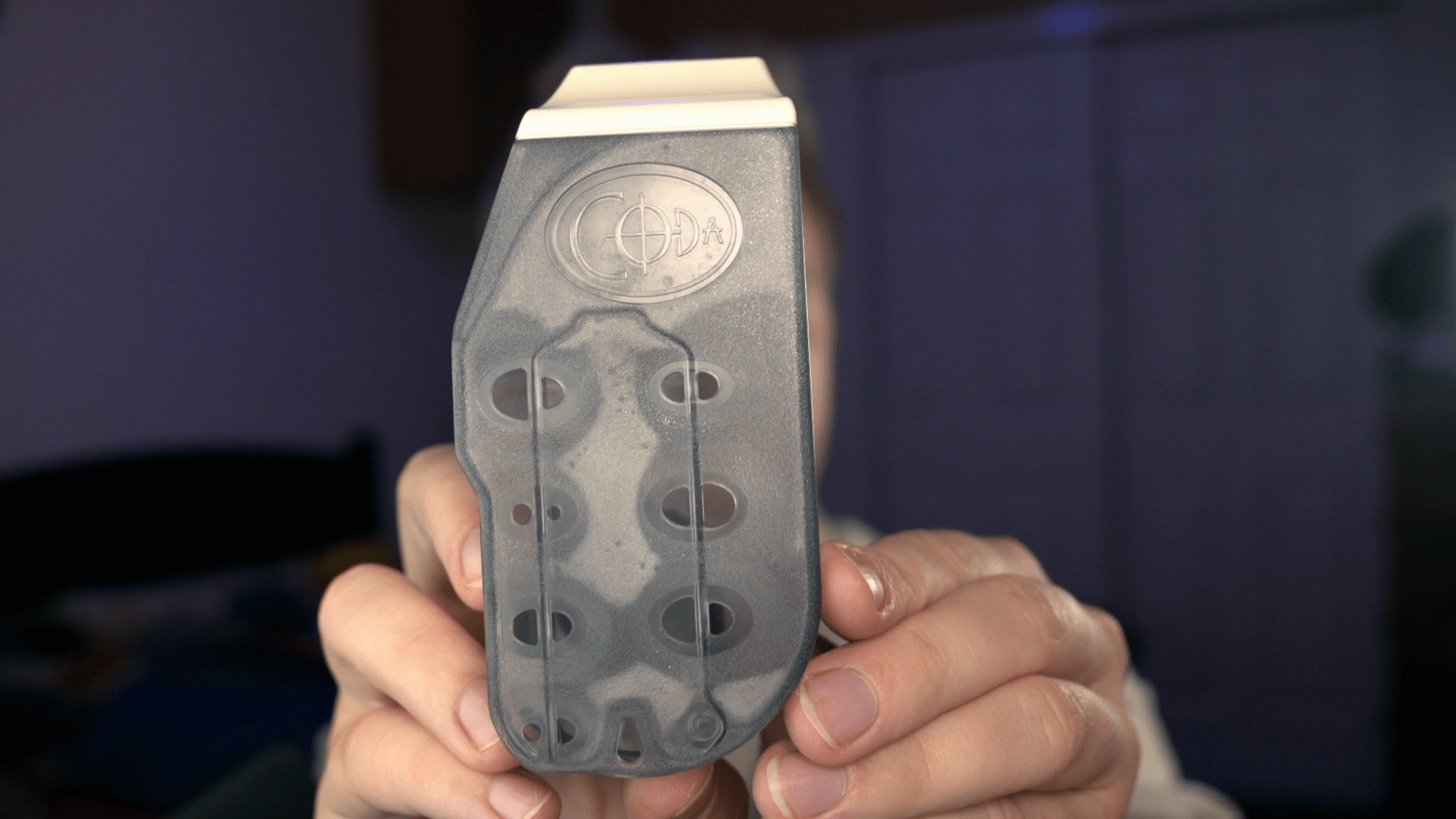
We’re back with an Ocarina review! First, refer to the video above for any and all sound references. Today’s instrument is the Coda Every Day Carry Flute, a unique double ocarina by Karl Ahrens, who’s also the founder of Mountain Ocarinas.

You can purchase the Coda EDC Flute for around $60 on Amazon, affiliate link here. The Coda, like Mountain Ocarinas and the Night by Noble, is of very reputable make. Furthermore, compared to most double ocarinas, the $60 is extremely affordable.

In the package you’ll get a note for learning resources on the superb codaedc.com website, a fingering chart with some sheet music, the instrument, a carrying pouch, and two mute plugs. You can insert them like so, and the ocarina will sound like pitched air, allowing you to even play so quietly that you won’t wake someone sleeping the next room over.

There’s even a little slot to store them.

Demo + Review

The main premise of the Coda is two octaves in your pocket, and judging by the form factor, they’ve succeeded. It’s a tiny, fully chromatic double ocarina in the key of C with a range of B4 to D6 (an octave plus two) in the 1st chamber and B5 to C7 in the 2nd. chamber

Basically, it’s the range of a 12 hole Alto C and a 12 hole Soprano G combined across two chambers.

First off, it sounds good, really good for a plastic ocarina. It’s a bit less bright than Karl’s other instruments, the Mountain Ocarinas, but it’s still brighter than most ocarinas. Next, it’s supremely impressive in its innovative design. It’s two ocarinas in one, and the fingering holes are all intuitively placed next to each other, which both chambers being congruent in their octaves—you can play a full C to C scale (each an octave apart) at the same time by covering all the same holes.

The Coda has medium breath pressure teetering on high, and it has fairly stable breath pressure throughout—you only need to add a little bit more air as you ascend the scale.

The only immediate comments I’d have is that there’s just a few awkward things, but this isn’t necessarily criticism. Compared to a traditional multi chamber, ocarina, there are a lot more stakes with swiching chambers. If you’re going from an F on the 2nd chamber to a C on the 1st, you have to lift all your fingers while switching chambers.

Similarly, the fingerings for many sharps and flats are not what you’d expect. The low C sharp is achieved by lifting your right thumb on the 1st chamber and by raising your right pinky while lowering your left pinky on the 2nd. F sharp uses the right ring finger on the first chamber and the right middle finger on the second. There are other awkward fingerings for sharps and flats, but the point is that most of these are not what you’d expect from an ocarina or even a Mountain ocarina, which has its own quirks with chromatic fingering.

However, I can let all of this slide because you can frankly get used to the differences with enough practice and because of what an amazing feat of engineering this. Compare the Coda to my Spencer Virtuoso double. The Spencer only has two more notes than the Coda, those being the low B and A on the first chamber, but you can kinda get them on the Coda if you cover all the holes, bend the ocarina down to get the B, and for the A, also slightly cover the fipple hole with your lower lip.

Awkward, but doable given how infrequently you dip below the low C in ocarina music.

Comparison

Given the Coda has the same range as a traditional double ocarina, we’ll start with comparing it with a more traditional double ocarina (we’ll use my Spencer Virtuoso in the video).

A traditional double ocarina frankly is a lot easier to use when it comes to chamber switches. As you play ascending notes on the first chamber, you can prep your hand for the second when you switch, and if you play descending notes on the second chamber, you can prep the first chamber with your left hand when you switch.

With the Coda, you can do no such prep, as high notes on the first chamber have most holes open, and low notes on the second have most holes closed. Songs that only dip between chambers are a lot more difficult here than with a single chamber. Again, this is simply alleviated with practice.

Is the Coda EDC for You?

If you’re expecting the Coda to feel like an ocarina you’re used to, it won’t. It’s technically a double ocarina, but it is very much its own instrument. Come in expecting it to be just like every ocarina you’ve played, and you’ll be disappointed. Treat it as a new instrument to master, and you’ll probably love it.

I love the somewhat bright tone, ultra-wide range, affordable price, convenient mutes, Karl Ahrens’ staple durability, and amazing innovation that makes two octaves fit in my pocket. I do find it awkward to play at times, but that could be alleviated by practice. Even with the more difficult learning curve, I am a huge fan of this instrument.

The Coda EDC isn’t for everyone, and that’s okay. Whether or not it’s for you, it’s an amazing feat of musical innovation and truly has the potential, with practice, to be your every day carry flute.

Thanks for watching this review, and if you choose to buy a Coda, please use the affiliate link in the description—it helps support the channel.

If you’re interested in non-traditional ocarinas, I recently reviewed an instrument from the predecesor to the Coda, Mountain Ocarinas! They’re also amazing little instruments.
My Overkill (yet low-friction) Video Production Workflow in OBS

This recording workflow is dumb, expensive, and overkill… but it’s mine.

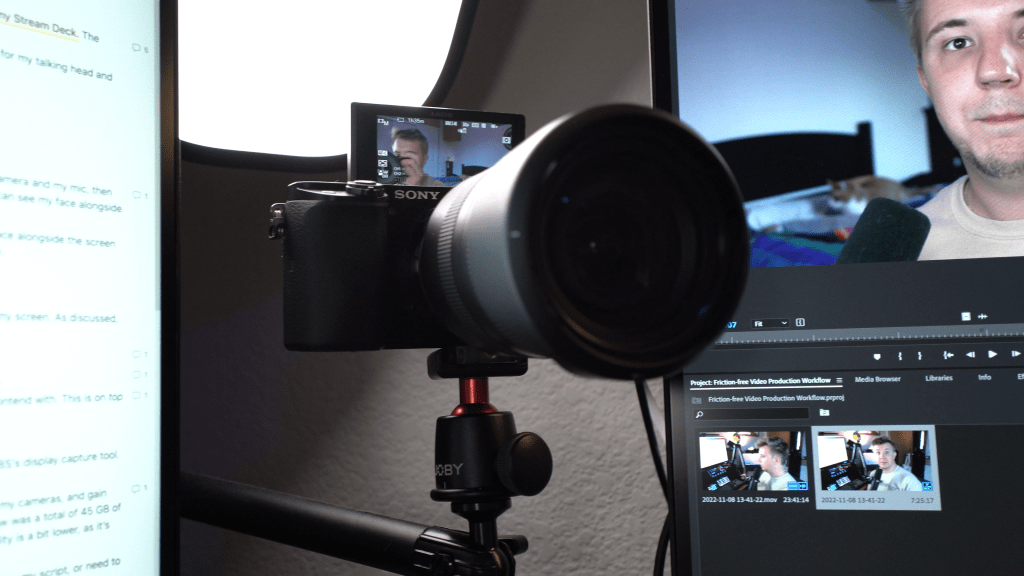
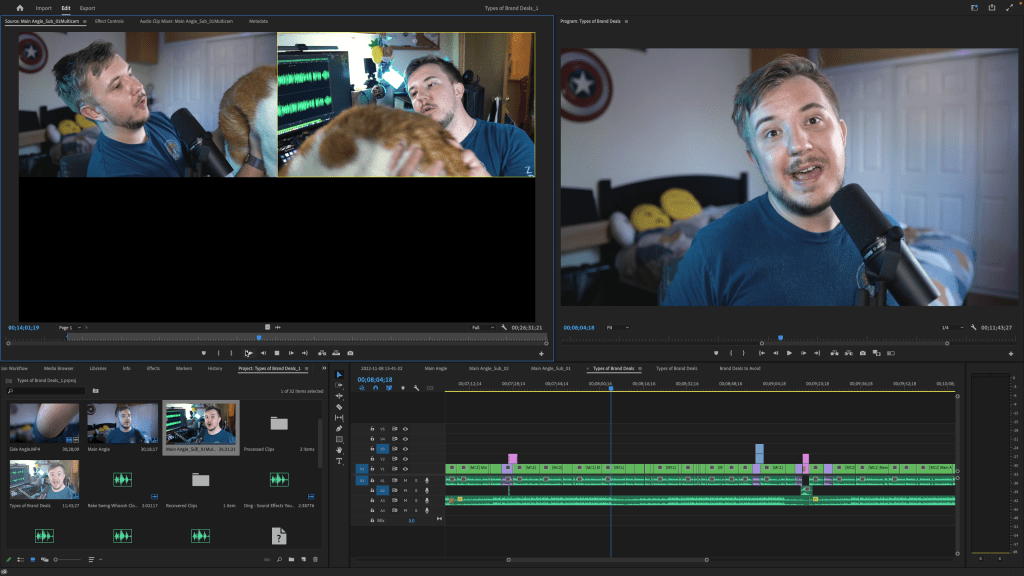
I have two 4K cameras plugged in to capture cards. I have an XLR setup with a Shure SM7B. I have lights I control with my Stream Deck. The nexus point for this all is my MacBook Pro running OBS.

You’d think, OBS is for streaming, right? That’s correct, and I hardly ever stream. I use this all for streamlined video recording, at least for my talking head and other A-cut shots.

Why do I do this? What’s the point?

In short, convenience in recording, recution in file sizes, and simplicity in editing.

Convenience in Recording

For example, I often do screen recordings in my videos. If I recorded everything separately, I’d have to record with my camera and my mic, then capture my screen as well, then sync it all, then adjust the scene in editing software so the camera is cropped and you can see my face alongside whatever’s on screen.

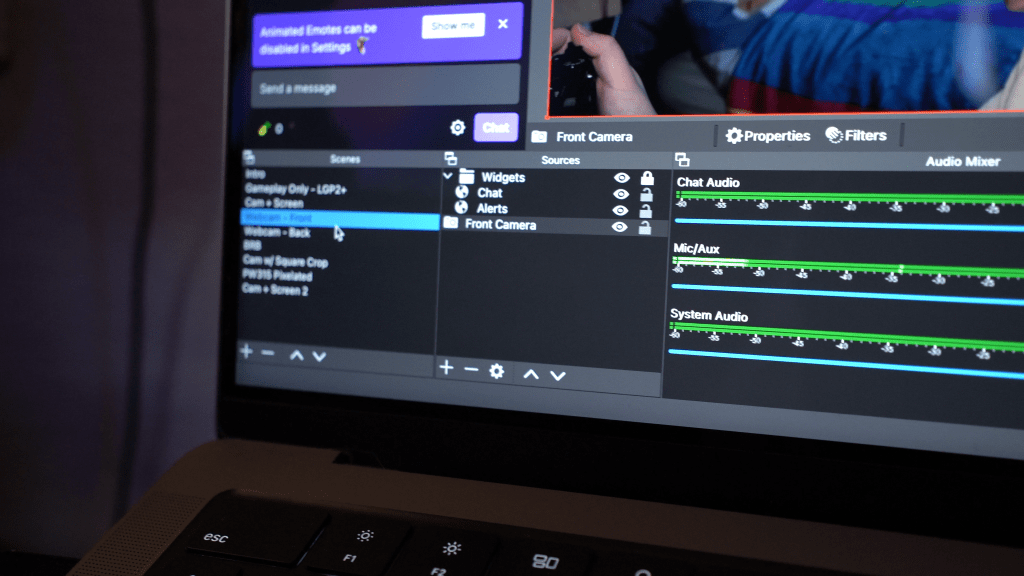
This is contrasted with my actual workflow: I switch scenes in OBS. Everything is already synced, and you can see my face alongside the screen capture. In addition to being infinitely more convenient than recording all of these separately, I also save a lot on file size.

I can get shots like this on the fly, which is super convenient!

Reduction File Sizes

In my recording workflow, I want to utilize two camera angles, make full use of my audio setup, and sometimes capture my screen. As discussed, not only would separate recording be inconvenient, I’d also be wrangling many, many more gigabytes of files per video.

Main camera shooting 4K the whole time? Huge files, but I use this camera for most of my videos.

Side camera shooting 4K the whole time? Huge files, and I generally only use it for the beginning and ends of my videos.

Recording my mic as a WAV file? It’s high quality for sure, but it’s overkill for YouTube, and it’s even more gigabytes to contend with. This is on top of the wasted data by replacing the audio from my cameras.

Capturing my screen? Yet another file.

Instead, I record everything in OBS: cameras via capture cards, mic via my USB XLR interface, and screen capture via OBS’s display capture tool. One file instead of many.

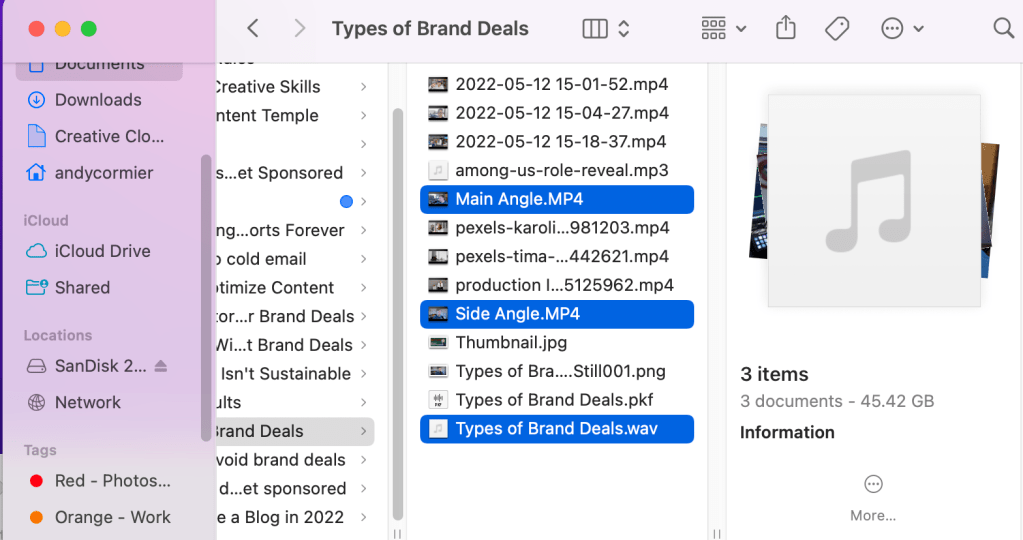
If I can combine all of these into one video file with my preferred mic already in use, eliminate the audio I won’t use from my cameras, and gain access to pre-synced screen capture when I need it, I save a lot on file size. One video I made with the disparate workflow was a total of 45 GB of data for 30 minutes of recording, while a 34 minute video in this workflow is around 10 GB. Yes, the audio and video quality is a bit lower, as it’s not direct from the camera or a raw WAV file, but for uploading to YouTube, people won’t notice the difference.

I can even pause the recording in OBS to save more on file size when I prep scenes, find what I’m screen capturing, practice my script, or need to step away, and everything is still conveniently synced.

When there’s less to edit, editing goes faster.

Simplicity in Editing

My old, disparate workflow also took a lot longer to edit. Syncing video and audio files into a multi-angle thingy was a hassle, and doubling the 4K video playing at once caused lag in editing.

In contrast, for at least the first cut of my video, all I need to do is cut out dead air, ums and buts, and when I flub lines. By saving so much time in both recording and editing my A-cut of the video, I get so much more time to add stylistic edits, shoot better B-roll, and focus on fleshing out the ideas I turn into videos in the first place, as well as simply make more content.

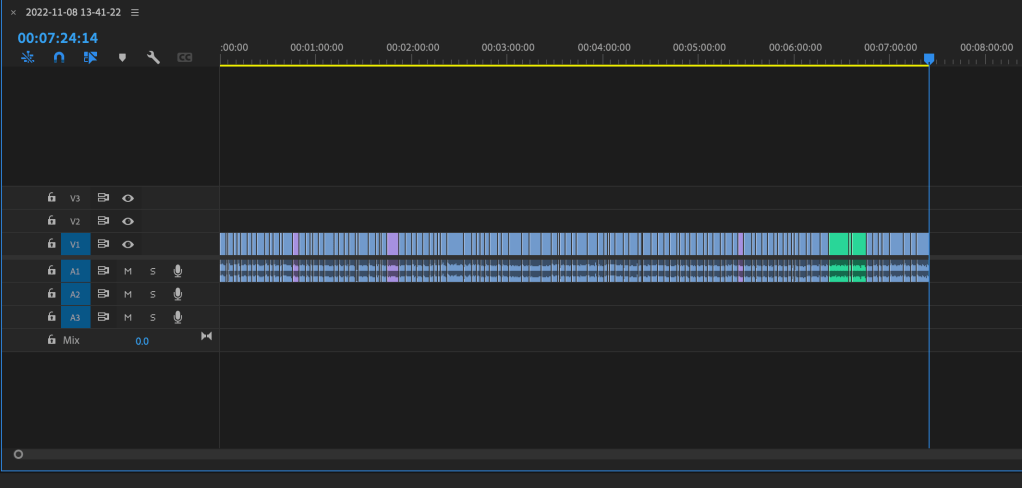
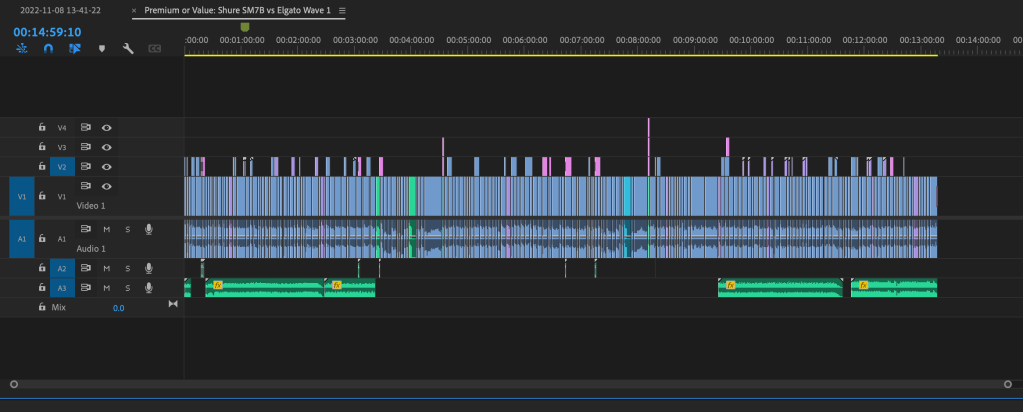
Quick note—when I say “A-cut” I mean the talking head cut, or the start-to-finish end-to-end recording that I do in OBS. No fancy edits, no added SFX or music, no B-roll added yet. The “B-cut” for me is when I add B-roll (like money shots of whatever I’m talking about), stock footage, music, SFX, text on the screen, and all that. Then I do final revisions, export, and upload the video.

In Short, Removing Friction

But the main idea is this: I have removed as much friction as possible between having an idea and creating a video. Even if you don’t employ this exact workflow, how can you remove friction between having an idea and making something out of it?

Since I used to work for a streaming-tech company, I have access to a lot of the tools to do this, and I’m really lucky to have all this tech, but advanced tech isn’t the only way you can remove friction.

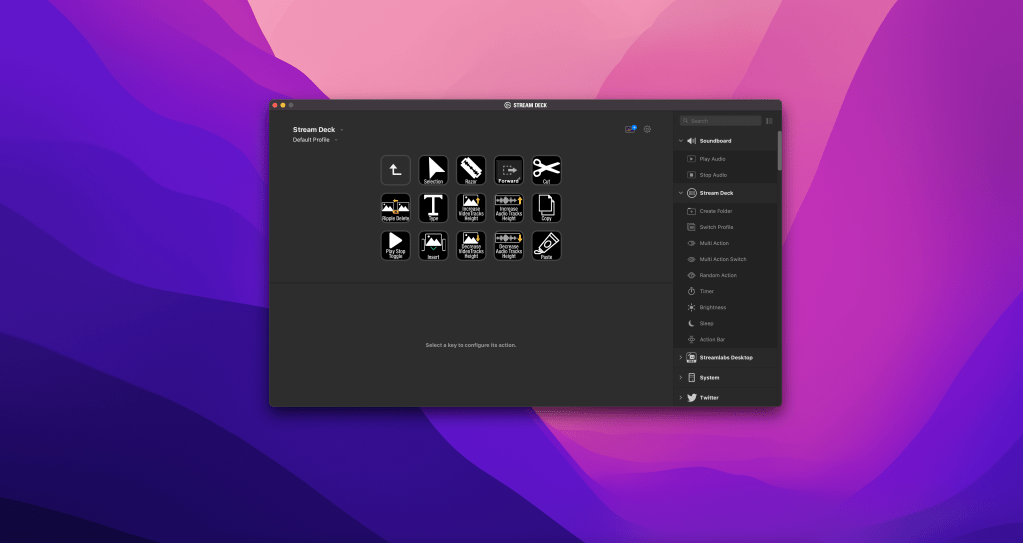
  • Maybe your biggest point of friction is remembering hotkeys in editing. Maybe map them to mouse buttons or a Stream Deck, or just study them for a bit?
  • Maybe your friction is in generating ideas. If it’s an issue of getting the ball rolling, you can try to list as many horrible ideas as possible—trust me, your ideas won’t stay horrible for long.
  • Maybe you’re exactly like me and should set up an over-the-top OBS recording setup to make your video workflow faster.

My weird OBS workflow simplifies my creativity and removes friction. It makes recording videos a breeze, dramatically reduces my file sizes, and makes the editing process a lot simpler. It might not work for you, but it doesn’t have to. It’s simply what removes friction for me.

On that note of removing friction, if you’re a creator overwhelmed with building your brand, consider learning more about content optimization, which is basically turning one idea into many pieces of content. It lets you get a lot more out of your creative effort, and I have a post on it here.

Do you NEED a Premium Mic? Shure SM7B vs. Elgato Wave 1 Microphone Comparison

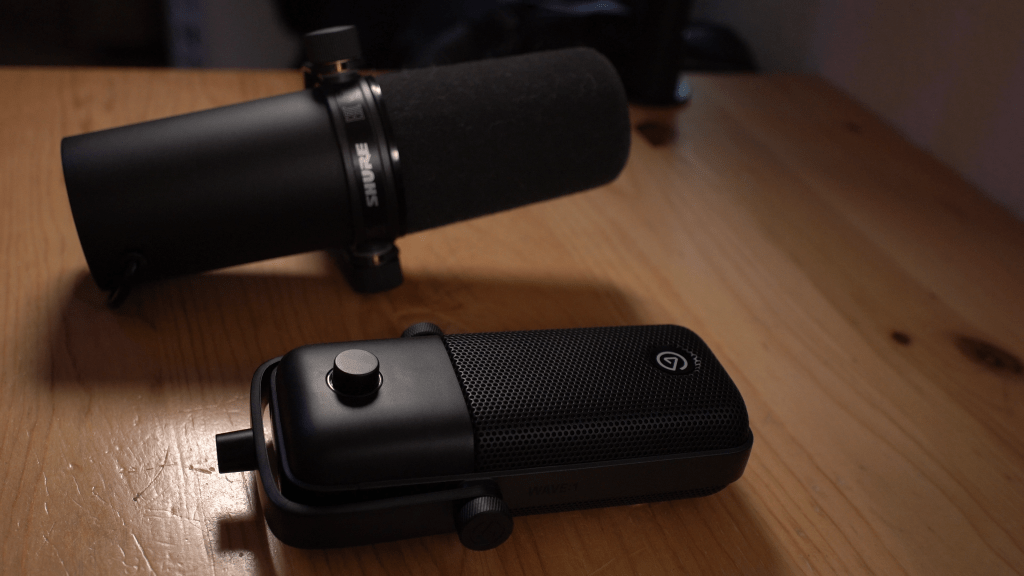
The Shure SM7B is a gourmet burger, but the Wave 1 is In N Out. You’ll understand why at the end of the post.

These Mics are Very Different… but used in similar ways

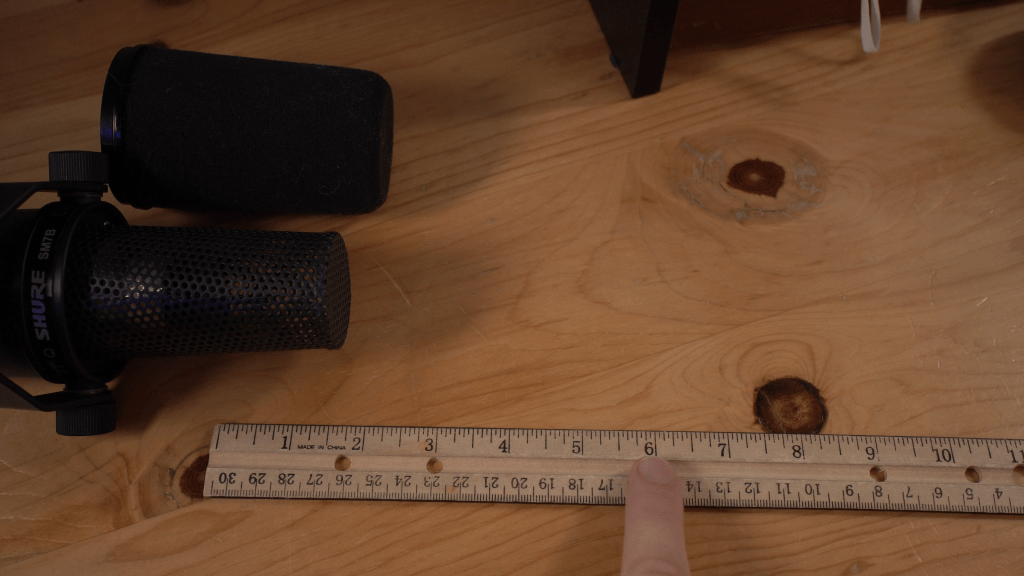
The Shure SM7B is a Dynamic XLR microphone costing $399, while the Elgato Wave 1 is a USB condenser mic costing $70, or $50 when on sale. These mics couldn’t be more different:

  • One is dynamic, one is a condenser.
  • One requires an XLR interface, one operates over USB
  • One has a studio price tag, one is amazingly affordable

…but people use these mics for more or less the same thing: content creation.

Affiliate links support my content! Buy the Shure SM7B here, and get the Elgato Wave 1 here.

But First, what are Dynamic and Condenser Mics?

Dynamic mics are relatively non-sensitive and are great at rejecting background noise. This makes them ideal for their typical uses: broadcast, spoken word, and live performance, though they do need more amplification (via higher gain) in audio interfaces. They’re so non-sensitive because they function differently than condenser mics. Dynamic Mics are passive and only activate when a sound wave vibrates the diaphragm, converting the sound wave into voltage.

On the other hand, Condenser Mics are active, with a diaphragm that’s powered typically either via USB power or via XLR with 48V phantom power. They also convert sound waves to voltage, but because they’re “always on,” they’re more sensitive. This sensitivity means most condenser mics don’t reject background noise well, but this also makes them ideal for studio recording thanks to their sensitivity to capture everything.

That all said, no matter what type of mic you use, you’ll want to place it relatively close to your mouth, adjust settings so you’re not peaking while speaking into it, and make some effort to reduce the background noise in your space.

With that introductory knowledge, back to the comparison!

Shure SM7B: The King

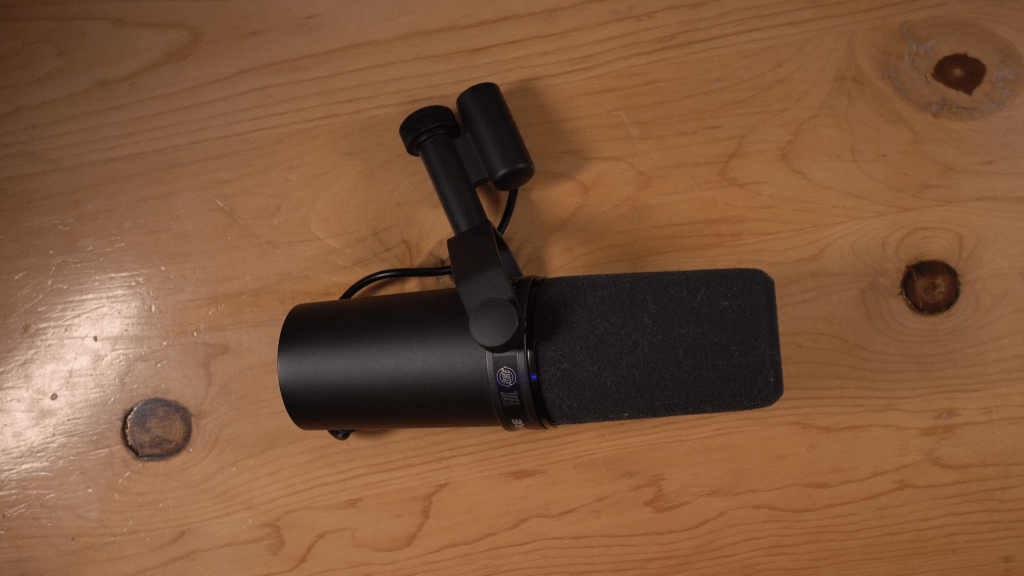
The Shure SM7B is an inescapable mic. Chances are most podcasters, streamers, and other creators you watch use this mic, and that’s for a good reason—it’s really good.

The Shure SM7B is a dynamic mic meant for professional broadcasting, meaning it frankly isn’t for everyone. TO get the most out of it, you probably need a superb XLR interface, potentially a cloud lifter to add clean gain to this gain-hungry beast, and superb mic technique. As a dynamic mic, it’s great at rejecting background noise, but that also means you need to be quite close to the mic for it to pick you up properly.

Refer to the video for sound samples! And I used the Night by Noble ocarina for the music test

I will say that for most people recording spoken word and even some music, the Shure SM7B may be one of the very best microphones, but that comes at a cost.

The mic alone is $400. A good XLR interface will range from $99 to hundreds of dollars. A good mic arm to keep the mic close to you will cost around $100. Sound treatment, depending on your space, can cost hundreds, and this can lead to a mic setup that costs well over $1,000 to get the most out of. Not to mention the steep learning curve of learning how to use advanced audio equipment in the first place! A lot of people make the SM7B sound bad simply because they don’t use it right, don’t have a good XLR interface, don’t learn how to adjust settings well, or any other reason related to setup or education. That all said, the SM7B has one of the highest quality ceilings of any mic, period.

Elgato Wave 1: The Best Economically

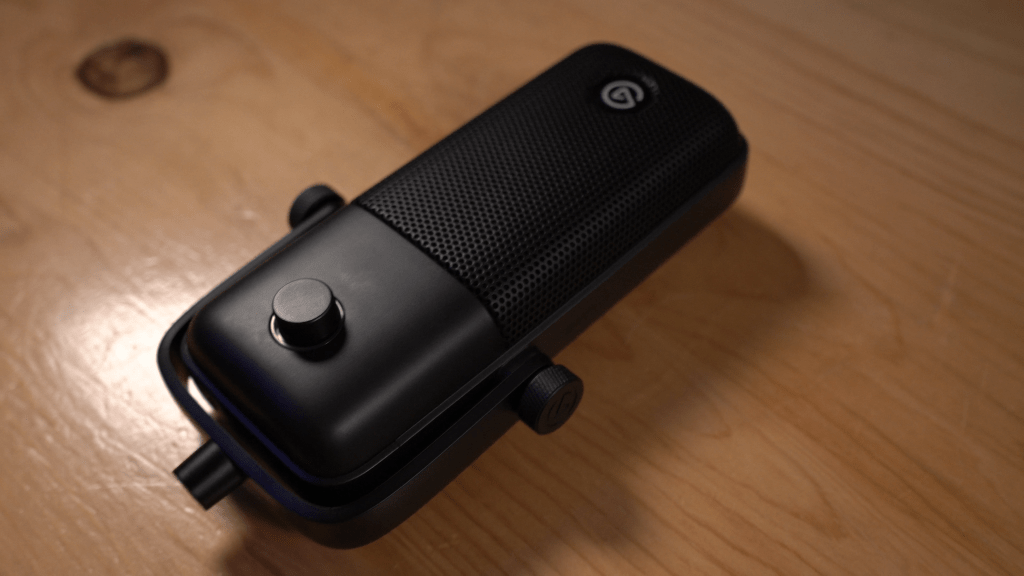
Compare this to the Elgato Wave 1, which we’ll be using to record this section. It’s a USB condenser mic, only costing $70 and with access to numerous amazing features via Elgato’s Wave Link software. It also sounds great, and I’d argue it’s the best quality per dollar you can get from a microphone, period.

It’s priced so low because Elgato keeps releasing new audio products, such as the Wave 3, which is an upgrade to this mic, the Wave XLR interface, the Wave DX dynamic XLR mic. While all those may be upgrades to this, we’re choosing the Wave 1 because the price is low.

As a condenser mic, it is a bit sensitive to background noise, but Wave Link allows you to install numerous effects to combat this such as noise gate, noise suppression, and more thanks to its VST plugin support. These types of plugins can be used in post-processing or as filters in OBS for streaming, but any processing done on the front-end is generally better for the creator use case.

Refer to the video for sound samples!

The Wave 1 is a fantastic mic. It’s kinda absurd that it’s as cheap as $50 on sale. It might not be fair to compare it to a Shure SM7B, but think about it: this $70 microphone is good enough to even compare to my nearly $800 audio setup (Mic: $400, Cloud Lifter: $100, AVerMedia AX310: $300, though I got the AVerMedia stuff for free while working there).

The Verdict: Which is for YOU?

Obviously, the Shure SM7B is the better microphone. It has much higher fidelity in its sound, and provided you use it right, is better suited for most creators’ use cases.

…but is it $350-500 better than the Wave 1? If you’re a YouTuber or Twitch streamer, you don’t need the highest fidelity sound, you don’t need the perfect studio setup, and you certainly don’t need an expensive audio setup. Unless you’re an audiophile with cash to burn or have a legitimate need for the SM7B, it’s frankly overkill for most people. Moreover, you especially don’t need equipment as expensive as the SM7B to get started. You can start a podcast with the Wave 1, and it’ll sound perfectly fine, hell you can use the voice memo feature on your phone if needed.

Improving your gear does not improve your ideas, and for the vast majority of creators, you literally just need your phone camera to get started. Maybe a capture card if you’re a gamer, but otherwise, it is frankly misguided to focus so much on gear. So many people focus on the specs and premium price of their gear when starting out when you should focus on developing your ideas.

Unless you’re a musician, professional photographer, artist, or high-production podcaster where the fidelity of your gear is a feature of the content, improving your gear will not improve your content. Even for these people where fidelity matters, a bad song is still a bad song, even when it’s recorded in a studio. A well-composed photo can still be taken with a smartphone. Only focus on gear upgrades if you’re obsesed and have the cash to burn or are building enough traction with your content to warrant an upgrade. Develop your ideas before you develop your studio.

Photo by DS stories on Pexels.com

This is all to say that for the price, the Wave 1 is outrageously good. You might want an SM7B, and you will probably sound better with one. But the Wave 1 gets you so far above the floor of “acceptable quality” that you may never even need to upgrade. If the average Twitch or YouTube viewer will prefer content over, let’s say, a 6/10 quality floor and won’t notice much difference above it, the Wave is easily an 8.5/10, and the SM7B can be a 10/10 if set up right (though most people make it sound like an 8/10 with improper use).

The SM7B is a better mic, and if you need it or really want it (and can afford it), it is worth the price, but the Wave 1 is just so affordable with such high quality. For my Californians, the SM7B is like, a gourmet burger that costs like $20, whereas the Wave 1 is like a $3 In-n-Out burger. Yes, the gourmet burger is better, but the quality-per-dollar economics on the In-n-Out burger are unparalleled. The Wave 1 is some of the best quality-per-dollar of any mic I’ve tried, and for most of you, it’s more than enough.

If you’re struggling with impulse purchases for gear you want but might not need, I have a video on that! It goes through the lens of buying ocarinas, but you can apply the exact same process to any gear upgrade you’re considering.

Don’t Buy Ocarinas from Amazon (Reviewing OcarinaWind and other brands)

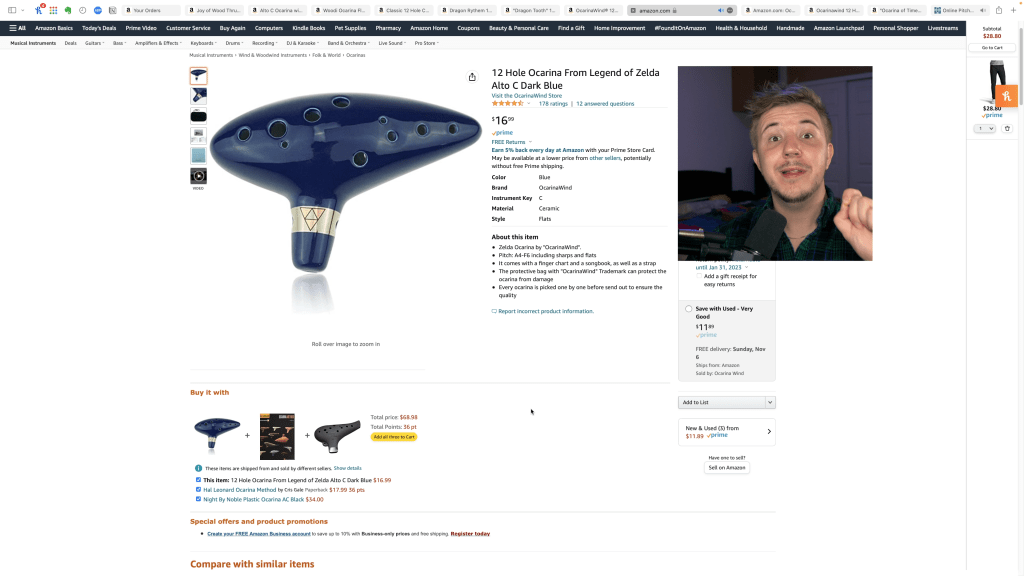
One of the biggest detriments to the public perception of the ocarina is that the most accessible ocarinas on Amazon are generally… bad. Two years ago, I sought to help prevent people from purchasing the unavoidable, cheap, out of tune Ocarina of Time replicas on Amazon, and nearly 100,000 views later, maybe I’ve succeeded.

The original video from 2020! My hair looked so bad…

However, these replicas, what many call the Ocarina of Crap, aren’t the only cheap instruments on Amazon. With brands like Ocarina Wind offering highly-reviewed ceramic ocarinas for under $30, are these just another scam, or are they worthwhile instruments?

Today, I’ll be investigating many cheap ocarinas from Amazon, mainly from the vendor everyone sees: OcarinaWind.

Are any of these vendors legit?

Would I recommend any of their instruments?

…or will I have the same result as last time?

Find out all this and more! I’ve purchased 7 ocarinas from these vendors on Amazon, and we’ll see which are worthwhile and which to avoid. Let’s get started.

The NEW review! Use this as an audio reference

The Roundup

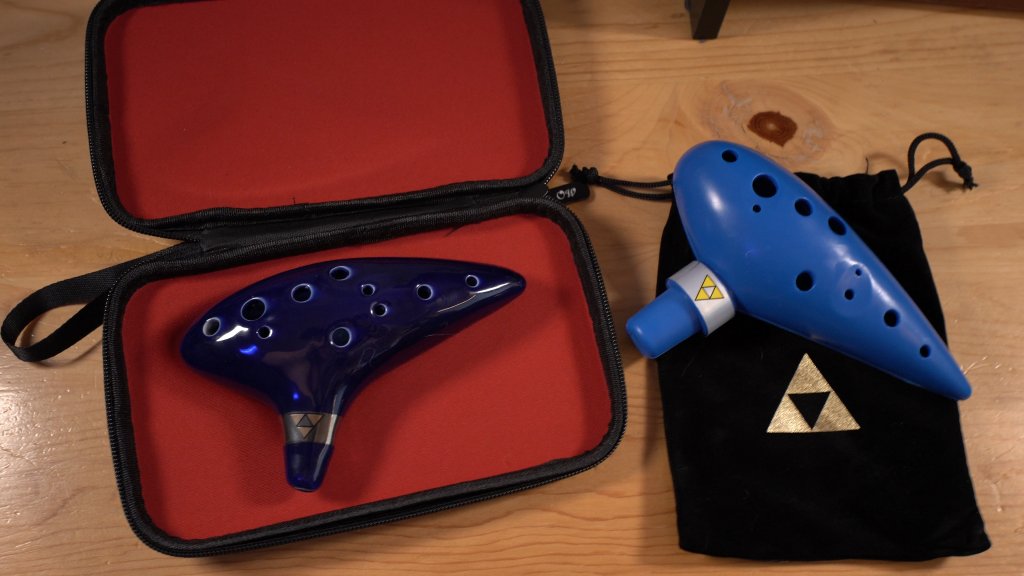
All of these ocarinas are 12 holes in the key of Alto C. I have a $27 ceramic one from awef, a $19 ceramic one from ZRAGEK, a $15 plastic one from Woodi, two ceramics from OcarinaWind ranging from $20-24, and two Ocarina of Time replicas from OcarinaWind, a $12 plastic, and a $17 ceramic.

I have affiliate links in the description for each of them, should you want to try any yourself, though wait until the end of the video before clicking ANY of them. Some, you might not want.

All The Single-Samples

awef’s $27 Ceramic Woodfire Style Alto C

We’ll start with awef.

Review:

  • Tuning: Good!
  • Breath Pressure: Low
  • Tone Quality: Good!
  • Ergonomics: A bit non-standard but not an issue
  • Aesthetics: Good except for a visible seam

DO I RECOMMEND: It don’t not recommend it, but there are better ocarinas.

ZRAGEK’s $19 Porcelain Style Alto C

Next up, the ceramic from ZRAGEK.

Review:

  • Tuning: Good!
  • Breath Pressure: Medium
  • Tone Quality: Good!
  • Ergonomics: Normal!
  • Aesthetics: Very pretty, except for the visible seam on the bottom

DO I RECOMMEND: Yes, this is the best one I tried, but I might have gotten lucky with the quality control. I had a good experience, but buy at your own risk.

Is Woodi’s $15 Wood-looking Plastic Any Good?

Last before we get to Ocarina Wind, the plastic from Woodi.

Review:

  • Tuning: Bad—and you can’t even “hit” the high notes unless you lower your breath pressure so much they’re out of tune
  • Breath Pressure: Inconsistent, not good.
  • Tone Quality: Airy, bad.
  • Ergonomics: Cramped—my right pinky finger
  • Aesthetics: The wood-looking plastic was interesting, and that’s about the only good thing I can say about this ocarina

DO I RECOMMEND: No. It’s a bad ocarina.

Aside from the Woodi, I was pleasantly surprised with the ceramics. They were in tune, sounded good, and were outrageously affordable. I certainly might have gotten lucky, and they may have issues with consistensy as many cheap ocarinas do, but I was shocked that they simply didn’t have any glaring issues. The ergonomics were a bit wonky, but that can simply be attirbuted to my muscle memory being built on different ocarinas.

The Ocarinas Wind

Strawfired Up for $24

Review:

  • Tuning: Good, but felt a little inconsistent
  • Breath Pressure: Low, and overblowing high notes results in squeaking—the high notes have an unnatural breath curve and, for most people, require using the acute bend technique to play clearly.
  • Tone Quality: Good, but a bit airy and not stellar.
  • Ergonomics: Good! No problems.
  • Aesthetics: Pretty! But too dark to see the strawfire details well.

DO I RECOMMEND: No. Sqeaky high notes are a problem.

It’s worth noting that this ocarina and the awef ocarina are very similarly built, of similar quality, and came in nearly identical packaging. It’s possible they might be different companies shopping from the same vendor.

Toot of the $20 Dragon Tooth

Review:

  • Tuning: Okay, but breath pressure inconsistencies make it hard to play in tune.
  • Breath Pressure: Very low for low notes, very high for high notes. This makes it very easy to be sharp on low notes and flat on high notes, making the ocarina very out of tune. The breath pressure curve is unnatural and bad.
  • Tone Quality: Decent, but the tuning issues caused by unnatural breath pressure really ruin the instrument for me.
  • Ergonomics: No problem
  • Aesthetics: It’s pretty, but a pretty instrument can still be bad.

DO I RECOMMEND: No. Unnatural breath curve and mediocre tuning make this a bad choice.

The Zelda Replicas

Ceramic… at the low price of $17

Maybe this Ocarina of Time isn’t an Ccarina of Crap?

Review:

  • Tuning: Some notes simply out of tune on top of the same tuning problem as the dragon tooth caused by breath pressure.
  • Breath Pressure: Same problem as the dragon tooth. Unnatural curve means low notes are easy to make sharp and high notes are easy to make flat.
  • Tone Quality: Airy, not great.
  • Ergonomics: Not one of its many problems.
  • Aesthetics: Too dark a shade of blue to be an accurate Ocarina of Time replica.

DO I RECOMMEND: Absolutely not, but it’s better than many Ocarinas of Crap

Welp, it’s not in tune. It’s an Ocarina of Crap. Don’t get this one. Next.

Will the $12 Plastic Ocarina of Time Fare Better?

My expectations are on the floor, let’s hope they don’t go lower.

Review:

  • Tuning: In tune!
  • Breath Pressure: Medium with a natural curve
  • Tone Quality: Airy—not great
  • Ergonomics: No problems
  • Aesthetics: It’s the right shade of blue!

DO I RECOMMEND: Yes, at least for the price. It isn’t usable for performance, but it’s in tune and natural to play. There are many far superior plastic ocarinas foir just $10-20 more, so I would recommend those instead.

It’s not great—it’s not good even, but it’s better than the ceramic ones from ocarina wind and actually could be used.

Is OcarinaWind (or any Amazon Vendor) Legit?

While I got some okay instruments from OcarinaWind, their ceramic Ocarina of Time replica was basically trash. On that note, aside from airiness, the plastic one outperformed all the ceramics I got from them. The fact that they even considered including such low quality ocarinas in their selection leads me to infer that they don’t care much about quality control or consistensy, even if they have some decent instruments in there. Just one piece of crap makes the entire shop stink—even if there are worthwhile instruments at OcarinaWind, I simply can’t trust them if their quality control won’t rule out unplayable ocarinas.

To complicate matters more, OcarinaWind has shady Amazon practices. The Ceramic Ocarina of Time that I bought is listed as unavailable, yet they have another listing of the same instrument for the same price. The listing name is different, and the number of reviews are different. This leads me to believe OcarinaWind is doing something shady on Amazon—maybe they make a model unavailable while they prune bad reviews or artificially inflate it with good ones, re-directing traffic to a different listing with more positive reviews? The point is, because of potentially shady business practices on top of mediocre-at-best instruments, I recommend that you do not purchase from OcarinaWind. I don’t want to discount good experiences folks have had with OcarinaWind, but as it stands, I will not purchase from them again, and I urge others to be careful if they even consider doing so.

Awef and ZRAGEK also profided good instruments, but it’s too small of a sample size to say I’d wholeheartedly recommend them—what if I got lucky, and they have quality control issues as well? That said, Awef and ZRAGEK had the only ceramic ocarinas in this review that I might actually recommend, but your experience may be different.

The Verdict: Would I Recommend Any of These?

Yes and no. I was surprised at how good some of these inexpensive ocarinas are (from Awef and Zragek), but I strongly believe it’s best to support reliable vendors and makers like Songbird, Imperial City, STL, Luna Celta, Night, and the like.

That said, if you’re looking to try a ceramic Ocarina and don’t have a high budget, I offer two options:

  1. Save your money until you can afford an instrument from a reliable vendor—among these vendors, Imperial City is the generally most affordable
  2. If not, buy one of the ocarinas I rated highly today! Again, affiliate links in the description

And if you’re in the market for a plastic ocarina, either get the ever-reliable Night by Noble or try a Mountain Ocarina! They’re back, and they’re great. Once again, affiliate links in the description.

Amazon Does Have Good Ocarinas, but…

Unless you know where to look, don’t browse Amazon for ocarinas. Ocarinas are an amazing instrument, and it hurts to see so many people think they are the problem when it’s actually a poorly made instrument. There were some surprisingly good instruments among the cheap ceramics I tried, but I’d wager that these are the exception rather than the norm.

Support reliable ocarina vendors—they’re the lifeblood of the ocarina community. And if you musy use Amazon to buy an ocarina, always, always make sure it’s from a reliable brand. Buy from Night, Mountain, Songbird, STL, one of those brands. Otherwise you’re gambling your money away on an instrument that might not work.

This all said, I want to help people on their ocarina journeys! If you’re only curious and haven’t bought one yet, read my post listing 7 reasons to buy one. If that doesn’t convince you, I’ll CRY.

How to Track Results in Brand Deals (to get more brand deals)

Companies want one thing, and it’s disgusting—numbers.

I have worked on the industry side of creator brand deals and learned a lot about what companies want in influencers they work with. My goal is to uplift and empower creators to have the best chance possible to #GetSponsored and help make their dream of full-time content creation a reality!

Marketing teams want to make sure any investment they make has an impact, and with the advent of social media metrics, tracking links, and more, it’s now easier than ever for companies to track tangible results on marketing investments made.

…But What Does This Have to do with Getting Sponsored?

Influencer marketing and creator sponsorships can have trackable results, but oftentimes any tracking that happens is done by the company with resources given to the creator. For example, if a company sends an influencer a product and asks them to link to it on Amazon, the company will generally provide the link for that so the company can see how many clicks and purchases the creator’s sponsored content drives. Some companies also use services that register influencers who work with them to see social post performance, like impressions, engagements, things like that. However, those services often don’t see the whole picture.

Outside of obvious things like social media metrics and tracking link clicks, influencer marketing performance is notoriously hard to track. It’s hard to measure these more nebulous things like steps of awareness. Let’s use Manscaped as an example. Let’s say a viewer watches Influencer 1, and they have a Manscaped ad. This may get Manscaped on this viewer’s radar, but they might not make any purchases at this moment. Let’s say after a few months, thanks to that initial awareness from Influencer 1, the viewer makes a purchase from Manscaped but uses a tracking link and discount code from Influencer 2. Influencer 1 was just as important as Influencer 2 in this viewer making a purchase, but you can’t directly track that.

I have been that viewer before, seeing numerous Manscaped ads from many creators I watch and support, but the one that led to my purchase wouldn’t necessarily be attributed to the many ads I saw before. This example happens all the time, and this is one of many examples of the difficulty in tracking influencer brand deal performance. As a result of these types of nebulous, hard to track things, some companies might not invest in certain influencers as much as they might want to or ought to. See where I’m going with this?

What if you could help track success for your brand deal activations? Some of these nebulous things are indeed effectively untrackable, like the Influencer 1 and 2 example, but there are areas you definitely can help sponsors in tracking and providing data for.

Ultimately, companies want hard metrics to understand their return on investment. If you can showcase your brand deals are successful, you’re more likely to get more of them. Here are some major areas to consider in tracking analytics in your sponsorships and other brand deals!

Provide Analytics for any Social Posts/Activations

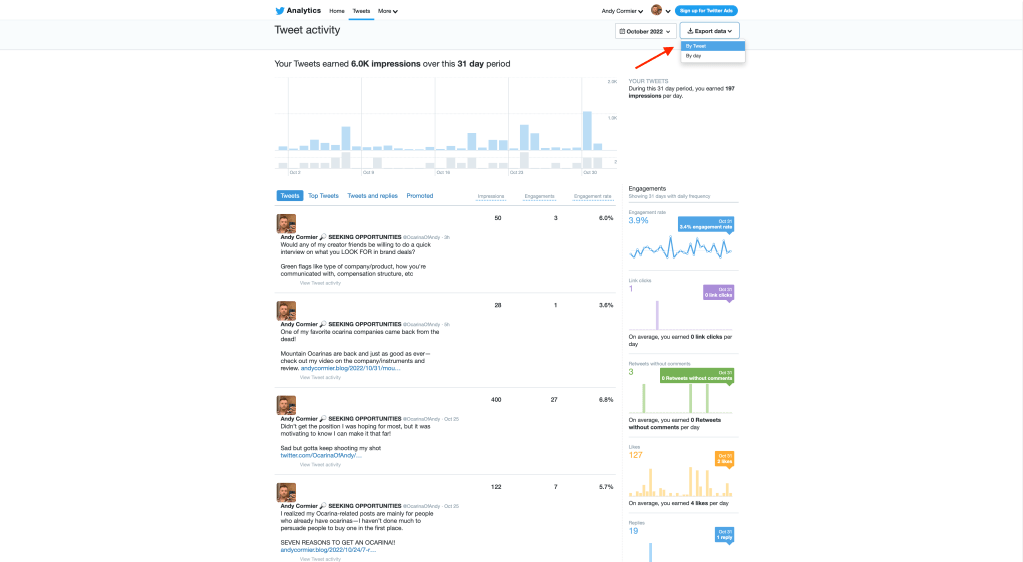
If a company sends you a product and you need to post an ad on Twitter, IG, or anywhere else, you can go into the analytics section and see really detailed information, like impressions, overall engagements, even link clicks. A tweet typically peaks within 2 hours, but I’d recommend giving these analytics after a week or so.

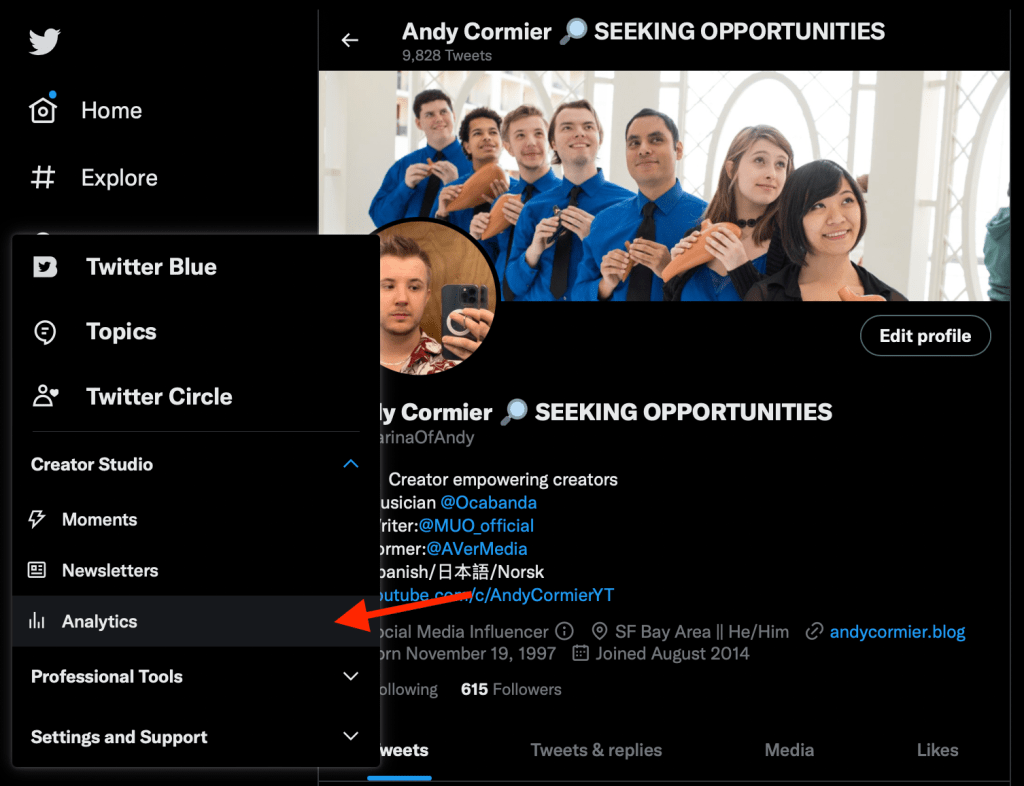
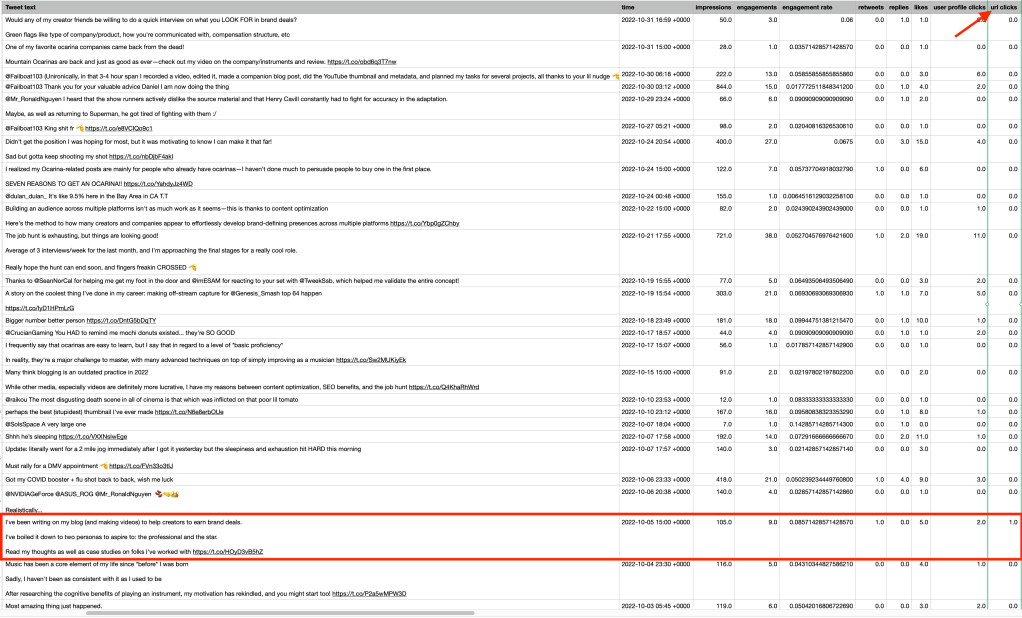
To find this information on Twitter, go to Creator Studio, click Analytics, go to the Tweets section, and make export data by Tweet for the relevant time period. Then, you can find the specific analytics such as impressions, likes, link clicks, and overall engagement rate. That said, if a company gives you a tracking link and has access to your social metrics, they can also surmise this information themselves.

On that note, if a company doesn’t give you a tracking link, you could use bit.ly to track some information by making a custom link, or use your own amazon affiliate link to direct traffic to a product for even more detailed info. These less organized companies will be impressed (and relieved) by your professionalism here.

Companies will generally provide links, discount codes, or other stuff for these kinds of activations, but the more impactful data you can provide for them like impressions, engagements, link clicks, and if possible, purchases, the happier a company will be. Most brand deals will track all of these for you by providing links/codes and connecting your social accounts to management platforms, but there are some things brands can’t easily track.

What About Sponsored Segments in Videos?

Did you know you can calculate, with pretty high accuracy, how many of your viewers actually watch an ad segment on a video or stream?

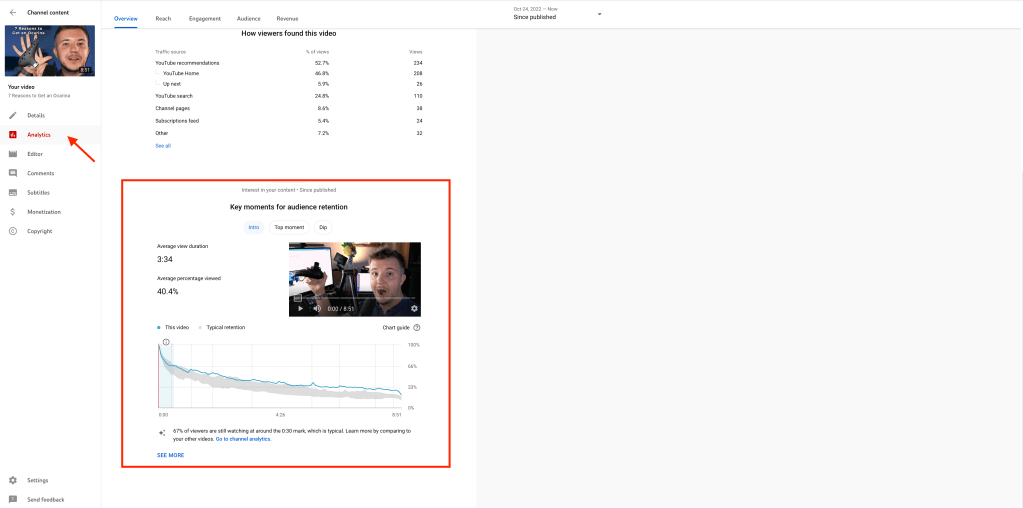
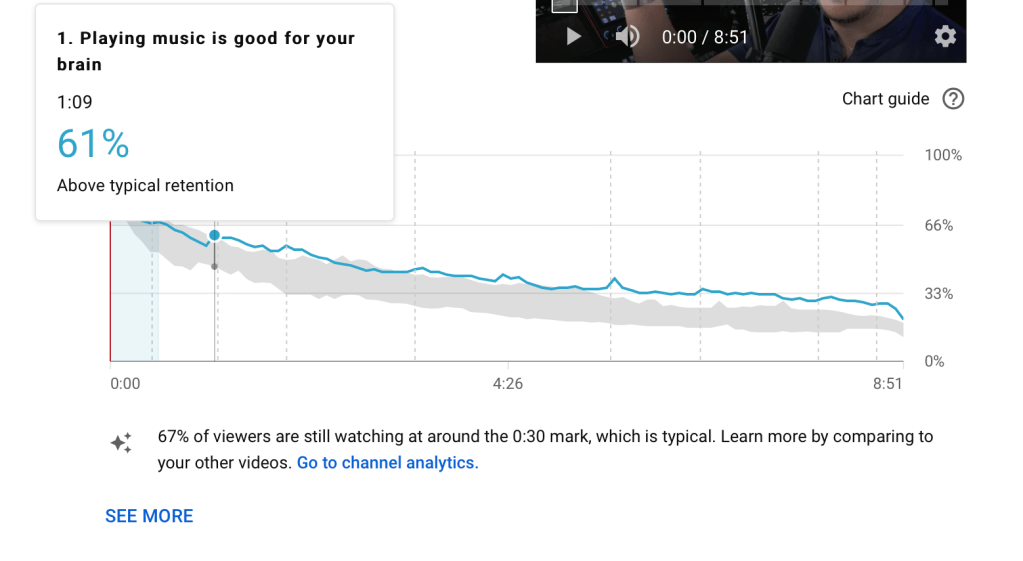
In YouTube analytics, you can see what percentage of viewers watch any given portion of a video. By mousing over the timestamps that contain your ad read, you can take that percentage and multiply if by total views, and get the # of people who watched an ad tread in your video. Let’s say you got 10,000 views and 50% of viewers watched the ad. That’d be strong exposure to those 5,000 people, especially if your audience lines up with a brand’s target market. On a stream, you can also check when you do an ad read and how many CCV you have through that to get the same exact reach metrics.

While you’d think these lower raw numbers for ad views would be detrimental, it can actually make you look better.

If a video has 10,000 views and gets 200 sponsored link clicks driving 50 purchases, 200 clicks divided by 10,000 views 2% clickthrough rate, and 50 purchases over 10,000 views is a 0.5% (raw) conversion rate. However, given 50% of your viewers watched the whole ad, factoring that in to the calculation doubles your rates. Swap 10,000 with 5,000 for the math above and you go up to a 4% clickthrough and 1% conversion rate. While yes, impressions on the admight be lower, it shows that the ad itself is more effective than raw numbers would have you believe.

This is data most companies can’t track. They can see how many views a sponsored video or stream might have, but they probably don’t have this level of specificity in that data. Providing information on not only how many people watched the video, but also what percent actually watched the sponsored segment will simply be extremely useful datafor a company to more accurately measure the success of whatever campaign they’re running. It also makes you appear more professional in the process with the extra data and will show the company you’re more effective than they realized. Creators who companies like to work with are typically the ones to get more brand deals.

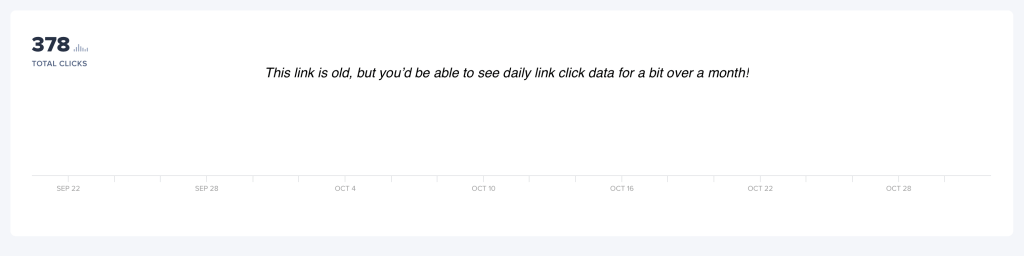
Do this on top of some other practices I mentioned earlier, like bit.ly whether or not a company provides a link or Amazon Affiliate linking if they don’t. If your activation is on multiple platforms, bit.ly is especially useful, because it differentiates traffic sources as well, saying how many might come from Twitter, YouTube, or other platforms —keep in mind if you’re on the free version, data lasts only 30 days.

Companies Want Returns on Investment, and Sponsorships are an Investment

If you add offers for ways you can report your results to them, like bit.ly tracking, gathering social metrics, calculating the % of viewers that watch an ad read, or anything like that, you’re giving brands a lot of confidence in you as a creator. Lots of creators will not report any data, and the only measurements you get are the tracking links you give them, and in many cases, brands aren’t going to ask for additional data. However, if you add this as an offer, while it is a bit of extra work, it’ll make you that much more appealing to #GetSponsored. Quick reminder, with all this talk on numbers, remember that you are a person, not your content or numbers, though knowing how to report on them is extremely useful in brand deals.

This advice, like many things, is all about making it as easy as possible for companies to want to work specifically with you. The vetting process is tedious, and many companies don’t have any systems in place at all to work with creators. The more high-quality information you include in your deck, like example activations, past results, and how you report data, the easier it will be for companies to trust you. Make sure you actually deliver on what you promise, ideally exceeding it, and keep at it!

This process of tracking is one way you can be a professional creator—one of the two types of creators companies want most for brand deals. Check out my post on that, and happy creating!

Mountain Ocarinas are Back from the Dead (Review)

Mountain Ocarinas are back from the dead! Given today is Halloween, that’s a perfect title.

Refer to the video review for sound samples and more detailed live comparisons.

Who are Mountain Ocarinas?

Mountain Ocarinas are a relatively unique ocarina maker, focusing on portability and durability in their design without sacrificing sound qulity in their instruments. The company has been around for at least 14-15 years, posting videos as early as 2008. The selection of these ocarinas included ocarinas made of polycarbonate plastic, stone, and wood, and all models were built to withstand even the most rugged of conditions. They were so confident in the durability that they had a “dinosaur guarantee,” where even if you went back in time and your ocarina was stepped on by a dinosaur, if it somehow broke, they’d replace it free of charge.

Sadly, within the last few years, Mountain Ocarinas shut down operations to focus on the founder’s (Karl Ahrens) other project: Coda EDC (Coda Every Day Carry Flute—a review of that coming soon). However, as of very recently, Mountain Ocarinas have started to come back!

Fun fact: my 3rd and 4th ocarinas in my collection were the two-pack of polycarbonate C and G Mountain Ocarinas, the first 2 being from STL. I’ve had these ocarinas since 2011, the year I started playing the ocarina, so they’re very dear to me! Furthermore, the ocarina community were quite big fans of this company as well, despite their non-traditional approach to the craft of ocarinas.

What are Mountain Ocarinas?

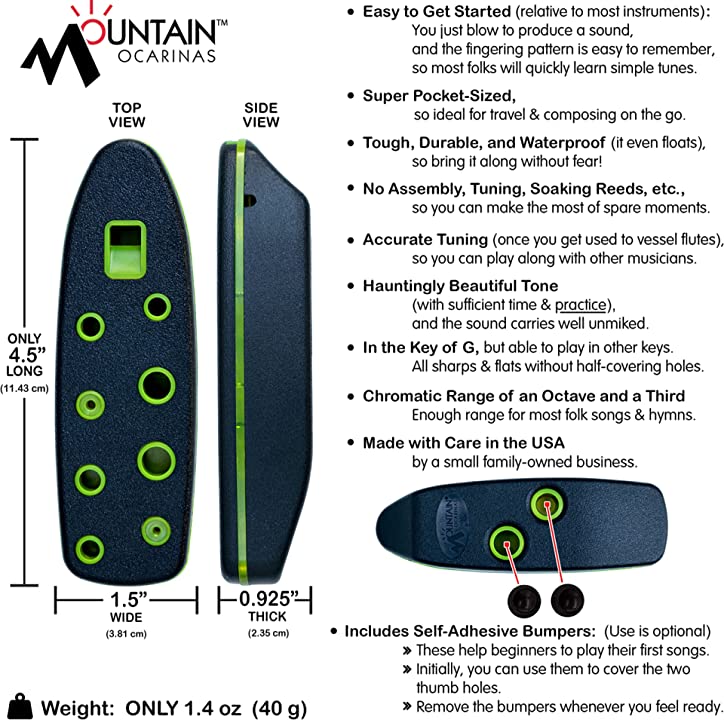
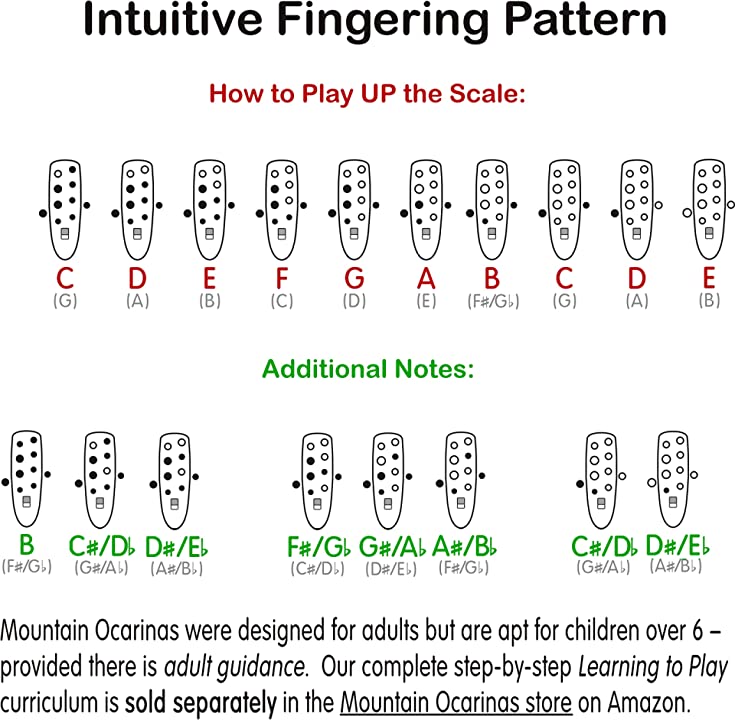
We’ve already gone over the durability aspect, but Mountain Ocarinas are inline ocarinas with linear fingering. Most ocarinas with linear fingering are transverse, the shape you’d typically expect, so from shape alone, they’re quite unique. The differences don’t stop there—Mountain Ocarinas have a slightly different fingering chart compared to most transverse ocarinas, as well as a reduced range due to only having 10 holes (with 9 holes for the currently unavailable alto C model).

The Mountain Ocarina in the key of G has a fully chromatic range of F#5 to B6, which is an octave plus three, compared to the octave plus five range of a 12-hole ocarina. A 12-hole soprano G would have one additional note above and below the Mountain, with a range of E5 to C7.

Unlike transverse ocarinas, you keep the pinky up and only drop it for the low F#. Similarly, you also reverse the order you lift the thumb holes—on a typical transverse, it’s left then right, whereas on Mountain, it’s right then left (which is like a pendant ocarina)

While this reduced range is a slight detriment compared to the already limited range of 12 hole ocarinas, it allows Mountain Ocarinas to maintain a significantly smaller size for comparable ranges—since they don’t need to fit subholes, they can make a much narrower instrument.

Fingering, shape, and range differences aside, we have the most important question: how do they sound?

They sound great. They have a much brighter sound than most transverse ocarinas, giving them a tonal quality somewhere in between celtic tin whistle and a typical ocarina.

Comparison to Original vs. New

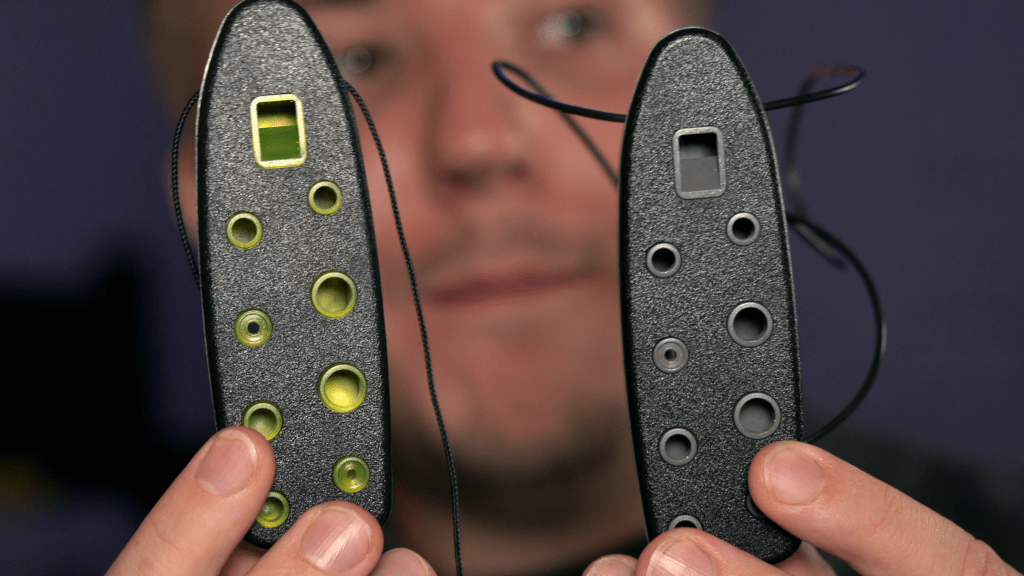
Now, how do the new Mountain Ocarina (currently only available on Amazon) compare to the original? They seem exactly the same, aside from the new one having green trim while the original is gray and different neck straps. The old is a somewhat rigid plastic strap, whereas the new has a more flexible fabric strap, which I personally prefer.

In terms of sound, does 11 years make any difference?

Demonstrably, the old and new Mountain Ocarinas sound exactly the same. The only differences are in minor aesthetics and the material of the neck cord.

Do I Recommend the Mountain Ocarina?

Yes—I emphatically recommend Mountain Ocarinas. That said, there are caveats to whether they’re right for you. If range is especially important to you, I’d recommend a 12-hole. If your musical goals are entirely in the realm of more normal ocarinas and you don’t want to learn a different fingering pattern that no other ocarinas use (that I know of), don’t bother! Whenever I pick up my mountain ocarina, it does mess with my 12-hole muscle memory for the first few minutes, so if that friction isn’t worth it, you don’t really need it.

However, if you want an instrument that’s especially portable as ocarinas go, outrageously durable, and still a competent instrument, it’s perfect. It warrants its price of $39.95, which is a bit more than the Night by Noble’s $35ish. I would still recommend the Night by Noble more for most people, as it is wider in range, similarly as durable, and a better stepping stone to more advanced ocarinas, but for almost any ocarinist, the Mountain Ocarina will be an extremely welcome addition to your collection. It’s perfect to bring on trips, to carry with you every day, and to make music wherever you go!

These are fantastic instruments, and I am so excited that Mountain Ocarina is back from the dead.